This daycare diaper change log is an Excel workbook for recording one row per diaper change, including the date, time, child ID, room, change result, staff initials, supplies note, supply follow-up, and report status.
The XLSX combines a validated Change Log, calculated review fields, editable Assumptions, and a date-and-room Summary to support consistent records and family reporting. Its prompts help staff review entries; they do not replace center policies or human judgment.
How this workbook can help
- Keeps the time, staff initials, change result, supply details, follow-up status, and family report status together in a consistent record.
- Helps staff prepare family updates by distinguishing reports marked Not entered, Ready, or Shared.
- Directs attention to missing required fields, missing supply notes, and daily totals that exceed the editable review threshold.
- Summarizes entered changes for a selected date and room so classroom operators can review counts and completion status.
What is in the file
How to get started
1. Set the center choices and limits
Open Assumptions and review the daily-entry threshold, earliest and latest allowed dates, room names, change results, follow-up choices, report statuses, and fictional staff initials. Edit the yellow cells when the center needs different values within the existing workbook structure.
2. Record each diaper change
On the Change Log, use one row for each event. Enter the date, time, center-approved child ID, room, change result, staff initials, supplies note when applicable, supply follow-up choice, and family report status.
3. Resolve the calculated review prompt
Read the Child Daily Total and Entry Check columns. Complete missing required fields, add a supplies note when follow-up is Yes, and verify entries when the child's daily total exceeds the threshold.
4. Review the daily summary
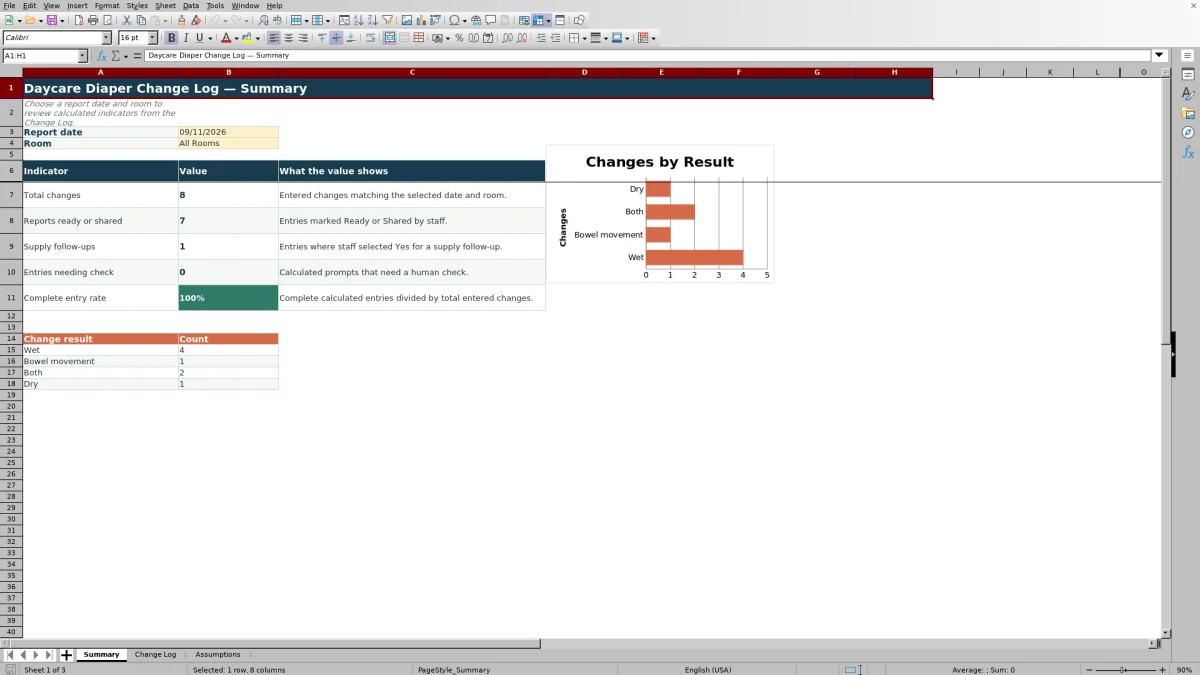
On the Summary sheet, select a report date and either a room or All Rooms. Review total changes, reports marked Ready or Shared, supply follow-ups, entries needing a check, the complete-entry rate, and change-result counts before deciding what requires staff attention.
Situation: Keeping daily diaper-change records consistent
A classroom may record several diaper changes across children, rooms, and staff members in one day. The operational need is not simply to remember a change time; it is to keep the date, time, child ID, room, result, staff initials, supply information, follow-up status, and family report status connected in one record. This workbook provides 120 entry rows for that structured process.
Action: Enter and review each change
Staff enter each event in the yellow input cells on the Change Log. Validation controls dates, times, text fields, and list-based choices, while the Assumptions sheet supplies the allowed date window, daily-entry review threshold, room choices, change-result choices, follow-up choices, report statuses, and fictional staff initials. The last two log columns then calculate the child's daily total and an entry-review message.
Result: Use the date-and-room summary
After records are entered, staff select a report date and room on the Summary sheet. The workbook calculates total entered changes, reports marked Ready or Shared, supply follow-ups, entries needing a check, the complete-entry rate, and counts for Wet, Bowel movement, Both, and Dry. The accompanying chart displays the change-result counts for the selected view.
Interpretation: A practical classroom example
Suppose staff enter two complete rows on September 11 for fictional child ID FIC-CH-001 in Infants A, at 8:10 AM and 10:15 AM. If both rows contain all required fields, Supply Follow-up is No, and the editable threshold remains 4, Child Daily Total displays 2 and Entry Check displays Complete. This means the workbook found two entered changes for that date and child, with no formula-based frequency prompt; it does not independently confirm that no other change occurred. When the Summary is set to September 11 and Infants A, those two rows contribute to Total changes, and they contribute to Reports ready or shared only when their report statuses are Ready or Shared.
Next decision: Choose the appropriate follow-up
A Complete result indicates that the formula found the expected required fields, any needed supply note, and no total above the current threshold. Add supply information when prompted, verify possible duplicate or unusually frequent records when Review frequency appears, and complete family-report preparation when a status remains Not entered. Staff should use the calculated result as a review aid and make the final decision according to center procedures.
Common entry errors and solutions
If Entry Check says Review missing fields, inspect Date, Time, Child ID, Room, Change Result, Staff Initials, Supply Follow-up, and Family Report Status, then complete the blank required field. If it says Add supply note, Supply Follow-up is Yes while Supplies Note is blank; enter a concise note describing the needed item or action. If it says Review frequency, verify that the date and child ID are correct and check for duplicate rows before deciding whether the count is accurate. If the Summary appears empty or unexpected, confirm that its selected date and room match the Change Log records.
Comparison: Excel workbook, paper, blank spreadsheets, and childcare software
The complete workbook method combines validated row entry, editable assumptions, calculated checks, and a filtered summary in one Excel file. The following comparison considers that full process rather than comparing its worksheets with one another.
| Method | More suitable when | Operational consideration |
|---|---|---|
| This Excel workbook | More suitable when a center uses Excel and wants guided entries, formula-based checks, and daily date-and-room summaries without adopting a separate platform. | Staff must maintain the file, enter records consistently, and manage access according to center procedures. |
| Paper log or manual form | More suitable when staff need immediate handwritten entry and dependable device access is unavailable. | Totals, missing-field checks, and family-report tracking require manual review or later transfer. |
| Blank spreadsheet | More suitable when an operator needs a highly customized layout and can build and maintain validation, formulas, and reporting logic. | It does not begin with this workbook's preconfigured fields, review formulas, choice lists, or summary indicators. |
| Dedicated childcare software | More suitable when a center requires centralized multi-user records, parent communication, permissions, or integrations offered by a specific provider. | Capabilities, setup requirements, subscriptions, data handling, and reporting options vary by product and should be evaluated directly. |
The appropriate choice depends on device access, collaboration needs, reporting requirements, staff workflow, and the center's recordkeeping policies.
Frequently asked questions
What information does the daycare diaper change log record?
Each Change Log row records the date, time, child ID, room, change result, staff initials, supplies note, supply follow-up choice, and family report status. It also calculates the child's daily total and an entry-review result.
How many diaper-change entries can the workbook hold?
The Change Log provides 120 entry rows, running from row 5 through row 124.
Can the rooms, results, staff initials, and review threshold be changed?
Yes. The Assumptions sheet contains editable cells for the daily-entry review threshold, allowed date window, room choices, change-result choices, follow-up choices, report statuses, and fictional staff initials used by the existing validation lists.
What do the Entry Check messages mean?
Review missing fields indicates that at least one required entry is blank. Add supply note appears when Supply Follow-up is Yes but the note is blank. Review frequency appears when the child's calculated daily total exceeds the editable threshold. Complete means none of those formula-based conditions was found.
Does this Excel log replace center policies or childcare software?
No. It is an operational workbook for entry, review, and family-report preparation. Centers should still follow their own supervision, privacy, retention, family-communication, and recordkeeping procedures and use dedicated software when broader system capabilities are required.
Editorial responsibility

Lena MoralesEnrollment and classroom workflows

Jordan LeeWorkbook QA and center operations