This daycare sign in sheet is an Excel workbook for recording each child's actual arrival and departure times, the people handling drop-off and pickup, room, assigned staff, attendance status, and notes. It provides transaction-level records rather than relying only on daily presence totals.
The XLSX also calculates valid hours present, identifies open or incomplete records for human review, and summarizes activity for a selected date. Childcare-center operators can customize the available rooms, staff assignments, date range, and duration-review threshold on the Assumptions sheet.
How this workbook can help
- Creates a consistent record of when each child arrives and leaves and who handles drop-off and pickup.
- Distinguishes completed departures, open visits, absences, and canceled records instead of showing only a daily headcount.
- Calculates hours for completed attended visits while leaving invalid or incomplete durations blank for review.
- Provides selected-date and room-level indicators that help staff review attendance activity and unresolved sign-outs.
What is in the file
How to get started
1. Configure the working choices
Open the Assumptions sheet and replace the fictional room and staff entries with the center's working choices. Confirm the earliest and latest permitted log dates, then adjust the duration-review threshold if the center uses a different internal review point.
2. Record the child's arrival
On the Sign In Log sheet, enter the date, child ID, display name, room, arrival time, drop-off person, assigned staff member, and Attended status. Use Absent or Canceled when no attended visit occurred.
3. Complete the departure record
When the child leaves, enter the actual departure time and pickup person's name. Do not overwrite the Hours Present formula; it calculates elapsed hours when the attended record has valid arrival and departure times.
4. Review the log and daily summary
Check the Check Needed column for missing information, open visits, or inconsistent times. Then select the date on the Summary sheet to review attended records, completed departures, children still signed in, absences, hours, and room-level activity.
What the Daycare Sign In Sheet Records
The log captures one attendance record per row, including entry date, child ID, child display name, room, arrival time, drop-off person, departure time, pickup person, assigned staff, attendance status, notes, calculated hours, and a review result. This structure gives operators the underlying arrival and departure details needed to investigate a daily count instead of treating the count as the complete record.
Arrival, Departure, and Pickup Workflow
Staff can begin an attended record at arrival and finish it after pickup. An attended row with an arrival but no departure remains an open visit, so the selected-date summary can count the child as still signed in. Once departure details are entered, the same row can contribute to completed departures and recorded hours.
Practical Example: Interpreting a Completed Visit
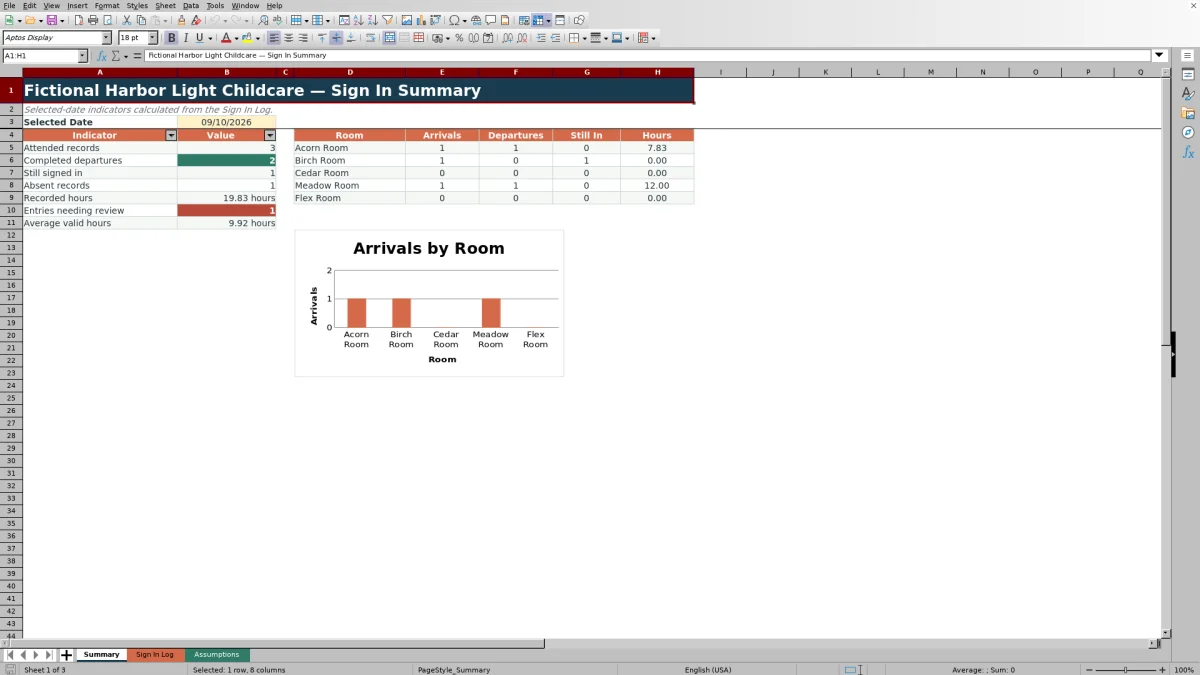
Situation: A fictional child arrives at 7:45 AM and leaves at 3:35 PM on the selected date. Action: Staff enter both times, the drop-off and pickup people, the room, assigned staff, and Attended status. Result: The formula calculates approximately 7.83 hours, and the record can be included as a completed departure. Interpretation: The child is no longer part of the still-signed-in count because both valid times are present. Next decision: Staff review the pickup name and Check Needed result, then correct the source entry if any detail is missing or inconsistent.
Common Entry Errors and Solutions
If an attended visit shows Open visit, enter the departure time and pickup person after the child has actually left. If the departure precedes the arrival, verify both source times and correct the mistaken entry; the workbook does not calculate hours for that invalid sequence. If a required date, child, room, staff assignment, status, arrival, or drop-off detail is missing, complete the applicable field. If a legitimate date falls outside the permitted range, review the earliest and latest dates on the Assumptions sheet before changing the limit.
Comparison: Excel Workbook, Paper Log, and Other Alternatives
The workbook operates as a complete method by combining row-level sign-in records, input validation, calculated hours, review prompts, and a selected-date summary. The most suitable method depends on the center's scale, device access, reporting needs, and recordkeeping procedures.
| Method | How it works | More suitable when | Trade-off |
|---|---|---|---|
| This Excel workbook | Uses a structured XLSX log, formulas, validation, review prompts, and a selected-date summary. | More suitable when a center wants a reusable local workbook and staff can maintain one controlled file. | It records typed drop-off and pickup names but does not provide an electronic-signature field, automated messaging, or multiuser check-in controls. |
| Paper sign-in sheet | Staff or families handwrite arrival, departure, and pickup information. | More suitable when devices are unavailable or the center's process depends on handwritten entries. | Totals, elapsed time, open visits, and error checks require manual review, and handwriting may be unclear. |
| Blank spreadsheet | Operators build their own columns, rules, and calculations from an empty grid. | More suitable when the center needs a highly customized layout and has someone who can design and test the controls. | Validation, formulas, review logic, and summaries must be created and maintained separately. |
| Dedicated childcare software | Uses a managed system that may include mobile check-in, permissions, family communication, and centralized records. | More suitable when a center needs multi-site access, real-time family workflows, user accounts, or broader system integrations. | It may require subscriptions, implementation, training, and vendor-specific data practices. |
Reading the Selected-Date Summary
The Summary sheet reports attended records, completed departures, children still signed in, absent records, recorded hours, entries needing review, and average valid hours for the selected date. Its room-level area shows arrivals, departures, still-in counts, and hours for the configured rooms, while the chart visualizes room arrivals. These indicators support review of the underlying rows; they do not replace verification of the sign-in log.
Customizing Assumptions and Review Limits
The Assumptions sheet contains editable earliest and latest log dates, a review-duration threshold, five room choices, six staff choices, and the Attended, Absent, and Canceled statuses. The duration threshold flags a longer recorded visit for human review and should be treated as a working control rather than a legal, licensing, or center-policy conclusion.
Frequently asked questions
What does this daycare sign in sheet record?
It records the entry date, child details, room, actual arrival and departure times, drop-off and pickup people, assigned staff, attendance status, notes, calculated hours, and any review prompt.
Does the Excel workbook calculate how long a child was present?
Yes. Hours Present is calculated for an attended record when both times are entered and the departure is not earlier than the arrival. Invalid or incomplete time sequences return a blank duration for review.
Can the workbook identify a child who has not been signed out?
Yes. An attended record with an arrival time but no departure time can appear as an open visit, contribute to the still-signed-in count, and produce a review prompt.
Can rooms, staff names, dates, and review limits be changed?
Yes. The Assumptions sheet provides editable room and staff choices, earliest and latest log dates, and a duration threshold used to flag longer visits for human review.
Is this workbook the same as a daily attendance total?
No. Its main task is to preserve individual arrival, departure, drop-off, and pickup details. The Summary sheet derives selected-date counts and recorded hours from those row-level entries.
Editorial responsibility

Lena MoralesEnrollment and classroom workflows

Jordan LeeWorkbook QA and center operations