This daycare withdrawal tracker is an Excel workbook for recording each child’s notice date, final attendance, account handoff, and stated withdrawal reason. It also keeps the child record ID, classroom, closure status, and brief administrative notes together in one row.
Built-in calculations show notice days and days to final attendance. The action indicator and Summary sheet support administrative follow-up by identifying upcoming final days, handoff tasks, completed withdrawals, missing information, and date or status issues.
How this workbook can help
- Keeps notice, attendance, handoff, reason, and closure details in one consistent withdrawal record.
- Helps staff identify open records, approaching final attendance dates, handoff follow-ups, and entries ready to close.
- Reduces inconsistent entries through configured lists, date validation, duplicate-ID checking, and a 250-character limit for reason notes.
- Provides summary counts and a withdrawal-reason chart for reviewing entered records without treating historical results as a forecast.
What is in the file
How to get started
1. Confirm the workbook settings
Open Lists & Settings and enter the as-of date used for current calculations. Set the upcoming final day window from 1 to 90 days, then review the available classrooms, withdrawal reasons, handoff statuses, and closure statuses.
2. Enter the withdrawal record
On Withdrawal Tracker, enter administrative details in columns A through L. Use a unique withdrawal ID, select available list values, and keep reason notes brief. Columns M through O contain the notice-day, days-to-final-attendance, and action-indicator formulas.
3. Review actions and correct issues
Filter the Action Indicator column to find account handoff follow-ups, upcoming final days, records ready to close, or data issues. Correct the underlying entry or setting rather than replacing the formulas.
4. Check the operational summary
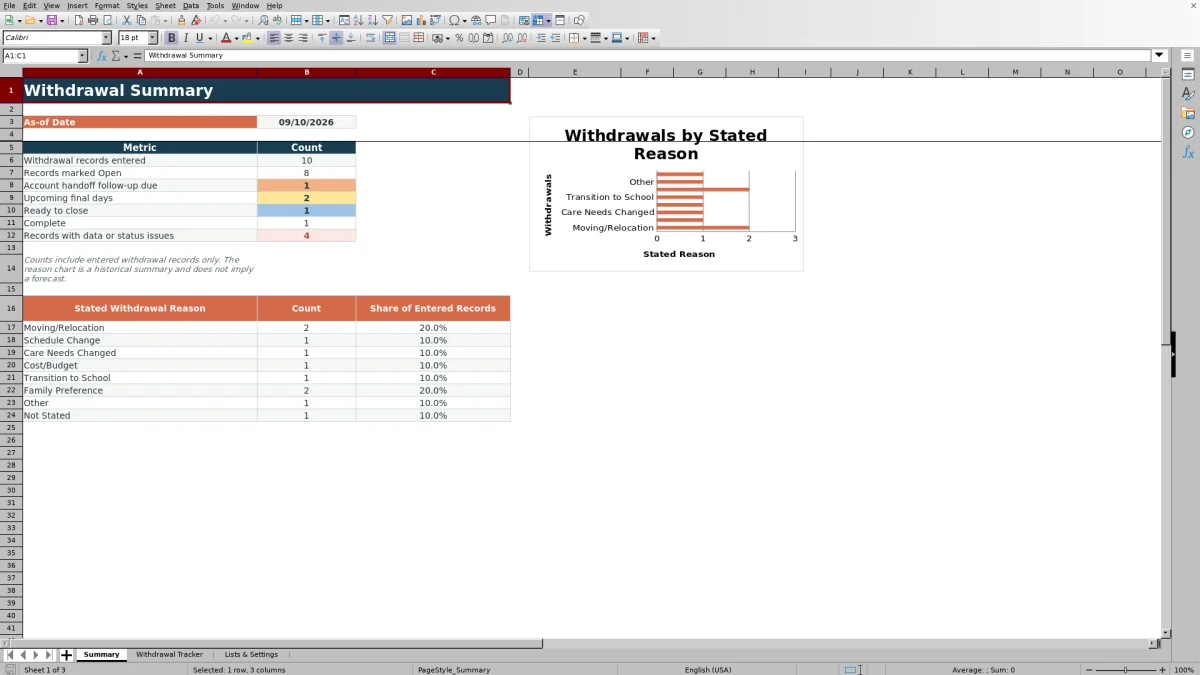
Use the Summary sheet to review entered and open records, follow-up counts, upcoming final days, completed records, issue totals, and the distribution of stated withdrawal reasons.
A Consistent Record for Each Daycare Withdrawal
Each Withdrawal Tracker row serves as a single operational record for a child’s departure. Staff can record the withdrawal ID, child record ID, optional display name, classroom, notice date, final attendance date, stated reason, brief notes, account handoff status and date, and record closure status and date. Keeping these details together makes it easier to see what happened, what remains open, and which dates support the record.
Configure Dates and Lists Before Tracking
The Lists & Settings sheet controls the as-of date and the upcoming final day window used by workbook formulas. Its configured lists provide six classroom choices, eight withdrawal reasons, four account handoff statuses, and two record closure statuses. Operators can replace values within the existing list ranges, but expanding those ranges requires corresponding changes to the validation formulas.
Move From Notice to Account Handoff and Closure
After staff enter information in columns A through L, the workbook calculates the number of days between notice and final attendance, calculates how many days the final attendance date is from the configured as-of date, and assigns an action indicator. Filters and conditional formatting can then help staff focus on handoff follow-up, approaching final days, records ready for closure, completed records, or entries that need correction.
Interpreted Practical Example
Situation: The fictional Avery Stone record shows notice on August 20, 2026, final attendance on September 4, a confirmed handoff dated September 3, and closure dated September 5. Action: Staff enter those dates and statuses in the withdrawal row while the workbook uses September 10 as its as-of date. Result: The formulas produce 15 notice days and negative 6 days to final attendance, and the completed handoff and closed record support a Complete indicator. Interpretation: The negative value means the final attendance date passed six days before the review date; it does not mean the entry is late or incorrect. Next decision: Staff can retain the completed record for administrative reference and direct current attention to rows that remain open or require follow-up.
Common Entry Errors and Their Solutions
A Settings Required indicator calls for an as-of date and upcoming-final-day window on Lists & Settings. Missing Required Fields means one or more core fields—withdrawal ID, child record ID, classroom, notice date, final attendance date, stated reason, handoff status, or closure status—needs an entry. Check Dates means staff should confirm that final attendance does not precede the notice date. Check Status/Dates calls for reviewing whether a handoff or closure date agrees with its selected status. Corrections belong in the source fields or settings, not in the formula columns.
Interpret Summary Counts With Context
The Summary sheet counts entered withdrawal records, records marked Open, account handoff follow-ups, upcoming final days, records ready to close, completed records, and records with data or status issues. It also reports counts and shares for the configured withdrawal reasons and displays them in a chart. These reason results summarize entered historical records; they should not be interpreted as a forecast of future withdrawals or as proof of why families make care decisions.
Comparison: Excel Tracker and Other Withdrawal Methods
The complete workbook method combines settings, structured entry fields, validation, formulas, action indicators, filters, summary counts, and a reason chart. Its suitability depends on withdrawal volume, staff workflow, integration needs, and the tools already used by the center.
| Method | Operational approach | More suitable when | Limitation to consider |
|---|---|---|---|
| Configured Excel withdrawal tracker | Uses a repeatable 200-row process with validated inputs, date calculations, action indicators, filters, and summary reporting. | More suitable when staff already use Excel and need a structured local method for monitoring notices through closure. | It does not automatically integrate with billing, parent communication, or another enrollment system. |
| Paper or manual checklist | Records each departure in a physical file or handwritten log and relies on staff to calculate dates and review pending tasks. | More suitable when withdrawal volume is very low and the center follows a physical-file workflow. | Counts, date calculations, issue checks, and consolidated reporting require manual work. |
| Blank spreadsheet | Lets staff design fields, lists, calculations, and reports from the beginning. | More suitable when the center needs highly customized fields and has someone available to build and maintain spreadsheet logic. | Validation, formulas, action rules, and summaries are not present unless staff create them. |
| Dedicated childcare software | May manage withdrawals inside a broader enrollment, billing, attendance, or family-communication system, depending on the provider. | More suitable when withdrawal tasks need to connect directly with other operational systems and the software supports those functions. | Capabilities, setup effort, access controls, and ongoing costs vary by provider and should be verified. |
The Excel tracker is a focused administrative method rather than an accounting, legal, regulatory, or official child-record system. Centers that require system integrations should evaluate dedicated software, while centers that need a controlled standalone log can use the workbook within their existing privacy and records procedures.
Frequently asked questions
How many withdrawal records can the Excel tracker hold?
The workbook is preconfigured for 200 withdrawal records in rows 2 through 201. Adding entries below row 201 may require staff to extend formulas, validation, conditional formatting, and the Summary sheet ranges.
Does the workbook calculate the daycare notice period?
Yes. Notice Days subtracts the notice date from the final attendance date. If either date is missing, the result remains blank; if final attendance precedes the notice date, the calculation remains blank and the action indicator can identify the date issue.
Which fields are required for the action indicator?
The indicator checks for a withdrawal ID, child record ID, classroom, notice date, final attendance date, stated withdrawal reason, account handoff status, and record closure status. Status and date combinations may also need review, such as a Submitted or Confirmed handoff without a handoff date.
Can a childcare center customize the dropdown lists?
Yes. Staff can replace entries within the existing classroom, withdrawal-reason, account-handoff-status, and closure-status ranges on Lists & Settings. If more list rows are needed, the related data-validation formulas must also be updated.
What information should not be entered in reason notes?
Use brief administrative notes only. The workbook’s usage note says not to enter payment, diagnosis, treatment, custody, or official compliance information, and the Reason Notes field is limited to 250 characters.
Editorial responsibility

Lena MoralesEnrollment and classroom workflows

Jordan LeeWorkbook QA and center operations