This Excel workbook helps childcare-center operators compare scheduled staff with entered child counts and center-defined staffing targets by date, shift, room, and age group. It calculates staff needed, shows the difference between scheduled and calculated staffing, and assigns a review status to each completed plan row.
The XLSX is a planning aid, not a legal compliance determination. Center leaders should review its results against applicable licensing rules, supervision requirements, staff qualifications, group-size limits, mixed-age rules, break coverage, and internal policies.
How this workbook can help
- Applies the same center-defined target calculation across each entered staffing plan row.
- Shows whether scheduled staffing is below, equal to, or above the calculated staffing need.
- Separates staffing concerns from incomplete, unmatched, or otherwise unworkable inputs that need correction.
- Provides a summary of children, scheduled staff, calculated staff needs, attention items, and status counts.
What is in the file
How to get started
1. Set the center's planning assumptions
Open the Assumptions sheet and review the age groups, target children per staff member, room names, shift options, planning dates, and row limits. Replace the starter values in the yellow input cells with the center's approved internal planning values.
2. Enter each staffing plan
On the Planner sheet, assign a unique Plan ID and enter the date, shift, room, age group, number of children, scheduled staff, and any useful notes. The sheet provides 100 planning rows and validates dates, list selections, and whole-number entries.
3. Review the calculated comparison
Read the target, Staff Needed, Staff Difference, and Review Status produced for each row. Correct incomplete or invalid entries, and investigate any row marked Check staffing rather than treating the status as a compliance ruling.
4. Make the next staffing decision
Use the Summary sheet to review totals, attention items, status counts, the coverage rate, and the status chart. Decide whether to adjust the schedule, verify an assumption, correct an input, or conduct a separate policy and licensing review.
Organizing daycare staffing plans by room and shift
The Planner provides 100 plan rows for recording a unique Plan ID, date, shift, room, age group, child count, scheduled staff count, and notes. Dropdowns draw from the options maintained on the Assumptions sheet, while the filter across the planning area helps operators focus on a particular date, room, shift, age group, or review status.
How the staff-to-child calculation works
The workbook looks up the selected age group's target children per staff member, divides the entered child count by that target, and rounds the result up to a whole staff member. It then subtracts staff needed from staff scheduled. A negative Staff Difference indicates that the schedule is below the calculated center-defined target; zero means it is at the target, and a positive number means it is above the target.
Review statuses distinguish Check staffing, At target, Above target, and No children from input-related outcomes such as Complete inputs, Check age group, and Check inputs. These labels support operational review and do not establish legal compliance.
Practical staffing example and interpretation
Situation: a fictional Young Toddler row has 11 children, 2 scheduled staff members, and a center-defined target of 5 children per staff member. Action: the workbook divides 11 by 5 and rounds 2.2 up to 3 staff needed. Result: Staff Difference is 2 minus 3, or -1, and the row displays Check staffing. Interpretation: the entered schedule is one staff member below this planning target. Next decision: the operator should review coverage, consider a schedule adjustment, and separately confirm the center's policies and applicable requirements before acting.
Common input errors and practical solutions
A row marked Complete inputs has a Plan ID but is missing one or more required values for date, shift, room, age group, children, or scheduled staff; fill in the missing fields. Check age group means the selected entry did not return a usable target; verify the age-group text and its target on the Assumptions sheet. Check inputs means the staffing calculation could not be completed; review the child count, staff count, and target for valid numeric values.
A duplicate Plan ID conflicts with the unique-ID validation, so assign a different identifier. A rejected date may fall outside the editable planning window, while a rejected child or staff count may be negative, non-whole, or above the configured maximum. Correct the entry or revise the appropriate limit on the Assumptions sheet if the center intentionally uses a different planning boundary.
Comparison: Excel ratio planner and alternative methods
Used as a complete operational method, this workbook combines structured entry, center-defined assumptions, staffing calculations, review statuses, and a summary in one XLSX. The following comparison describes when it or an external alternative is more suitable.
| Method | Operational approach | Calculation and review support | More suitable when |
|---|---|---|---|
| This Excel ratio planner | Enter plans by date, shift, room, and age group, then review calculated results and summary indicators. | Includes target lookup, rounded staff need, staff difference, input validation, review statuses, totals, and a chart. | More suitable when a center wants a reusable file-based process with editable internal targets and no requirement for a connected childcare platform. |
| Paper or manual checklist | Record counts and staffing by hand and calculate or inspect each situation separately. | Depends on manual arithmetic and manual aggregation, with no built-in validation or status summary. | More suitable when the plan is very small, temporary, or completed where spreadsheet access is unavailable. |
| Blank spreadsheet | Build columns, formulas, lists, checks, and reports from the beginning. | Capabilities depend on what the user creates and tests. | More suitable when the organization needs a substantially different data structure and has staff who can design and maintain it. |
| Dedicated childcare software | Manage staffing inside a broader operational system whose available modules vary by product. | May connect staffing with attendance or other center workflows, depending on configuration. | More suitable when the center needs integrated, multiuser operations and has resources for software selection, setup, training, and maintenance. |
No method removes the need for human review of current licensing rules, staff qualifications, supervision, breaks, room movement, and other circumstances that a row-level ratio calculation does not capture.
Editable targets, options, and validation limits
The Assumptions sheet stores editable assumptions for six age groups, six room options, three shifts, the earliest and latest planner dates, and maximum child and staff counts per row. The starter targets are 4 children per staff member for infants, 5 for young toddlers, 6 for older toddlers, 10 for preschool, 12 for pre-K, and 15 for school age.
The default planning window runs from January 1, 2026, through December 31, 2027, with limits of 60 children and 20 staff per row. These are workbook settings rather than legal limits, so operators should revise them only according to the center's planning process and verify governing requirements separately.
Using the summary for the next staffing decision
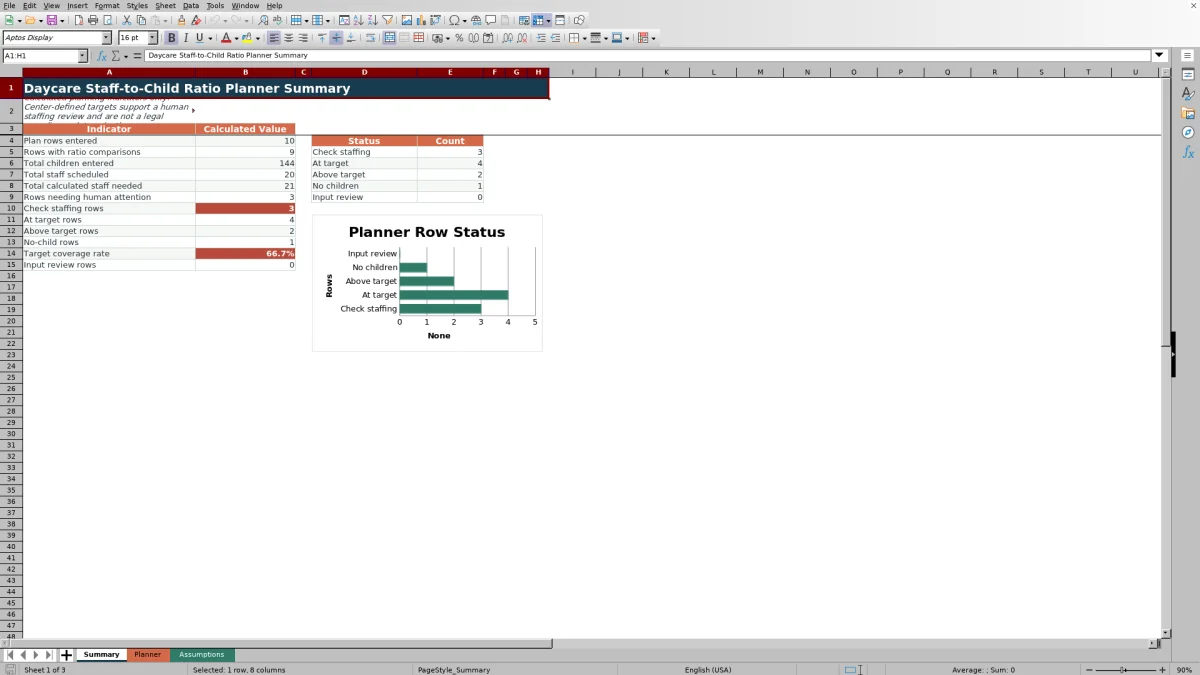
The Summary reports entered plan rows, rows with ratio comparisons, total children, total scheduled staff, total calculated staff needed, and rows requiring human attention. It also counts Check staffing, At target, Above target, No children, and input-review outcomes and presents those status totals in a chart.
The target coverage rate divides At target and Above target rows by all rows classified as Check staffing, At target, or Above target. It excludes No children and input-review rows, so operators should read the percentage together with the attention counts before deciding whether to revise staffing, correct data, or review assumptions.
Frequently asked questions
Does this Excel planner determine legal staff-to-child ratio compliance?
No. It compares scheduled staffing with editable center-defined targets and supports human review. Applicable licensing, supervision, qualification, group-size, mixed-age, and break-coverage requirements must be confirmed separately.
How does the workbook calculate staff needed?
It divides Children Entered by the target children per staff member for the selected age group and rounds the result up to the next whole staff member.
Which values can a childcare center edit?
Operators can edit age-group targets, room options, shift options, earliest and latest planner dates, maximum children per row, and maximum staff per row. They can also enter or replace the fictional sample plans on the Planner sheet.
What should an operator do with a Check staffing status?
Review the child count, age group, target, and scheduled staff entry first. If the inputs are correct, assess available coverage and applicable center and licensing requirements before deciding whether to change the schedule.
How many staffing plans can the workbook hold?
The Planner contains 100 planning rows, from row 4 through row 103. Each populated row should use a unique Plan ID.
Editorial responsibility

Lena MoralesEnrollment and classroom workflows

Jordan LeeWorkbook QA and center operations