This daycare toileting schedule Excel workbook helps childcare-center operators coordinate routine bathroom reminders and staff handoffs based on guardian-provided routine plans. It connects child plan details with a 200-row daily schedule, allowing staff to record assignments, statuses, completion times, and handoff information.
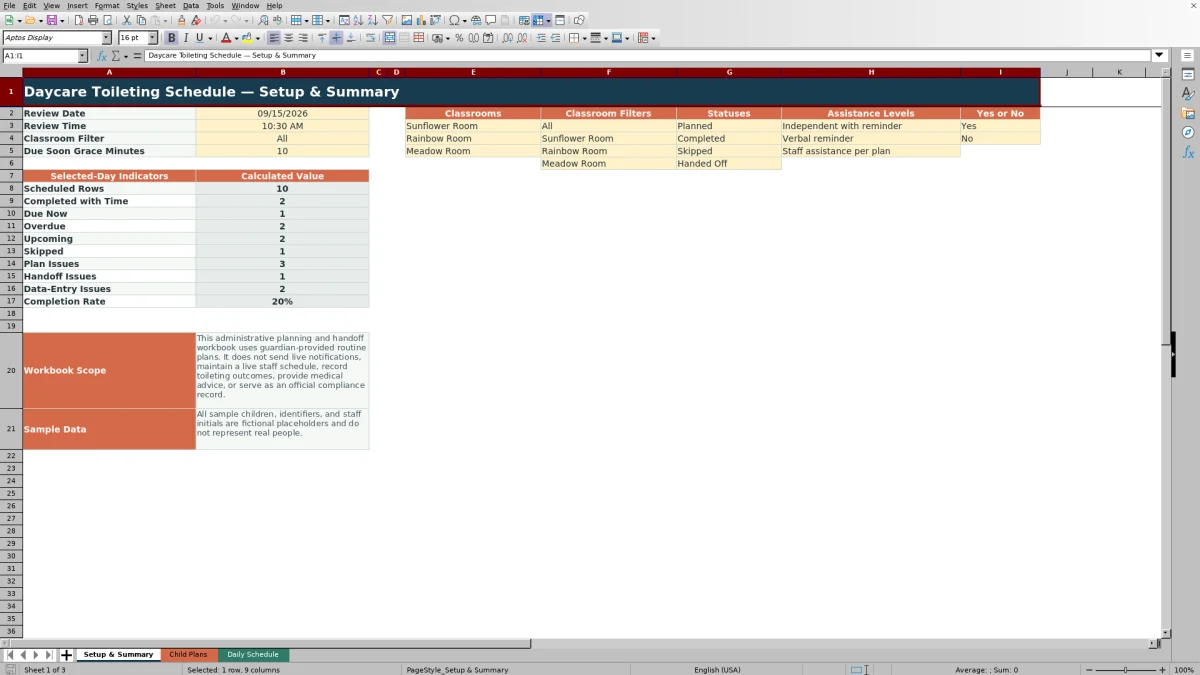
The XLSX also provides a selected-day summary based on a review date and time, classroom filter, and due-soon grace period. Formula-driven indicators identify plan, timing, handoff, and data-entry issues, but the workbook does not send live notifications, maintain a live staff schedule, or record toileting outcomes.
How this workbook can help
- Coordinates guardian-provided reminder plans, daily assignments, completion records, and staff handoffs in one workbook.
- Retrieves each selected child’s display name, classroom, planned time, assistance level, and handoff note from the Child Plans sheet.
- Helps staff identify due, overdue, upcoming, skipped, completed, and incomplete schedule entries through calculated indicators.
- Provides selected-day counts and a completion rate that can be filtered for all classrooms or one listed classroom.
What is in the file
How to get started
1. Enter each child’s plan
Plan the routine on the Child Plans sheet by entering the child ID, display name, classroom, plan dates, guardian plan update date, up to five reminder times, assistance level, active status, and relevant notes. Review the Plan Indicator and correct any flagged information.
2. Prepare the daily schedule
Schedule each reminder by entering a date, child ID, and routine slot from 1 through 5 on the Daily Schedule sheet. The workbook looks up the child’s name, classroom, planned time, assistance level, and plan handoff note.
3. Document staff activity
Record assigned staff initials and select Planned, Completed, Skipped, or Handed Off. Add a completion time for completed reminders. When responsibility transfers, enter the receiving staff initials and handoff time.
4. Review the selected day
Review the date, time, classroom filter, and grace minutes on Setup & Summary. Use the summary counts and the Daily Schedule checks to resolve overdue items, missing completion times, incomplete handoffs, and plan problems.
What the daycare toileting schedule coordinates
The workbook treats the guardian-provided plan as the source for routine reminder times, assistance levels, routine notes, and handoff instructions. Staff use the Daily Schedule to assign a routine slot, document its status, record completion or transfer details, and review calculated checks. This supports administrative coordination without turning the file into a clinical record or an outcomes log.
How the three worksheets work together
Child Plans stores up to 100 plan records and as many as five reminder times for each child. Daily Schedule provides 200 operational rows and uses formulas to retrieve the selected child’s display name, classroom, planned time, assistance level, and handoff note. Setup & Summary then counts records for the selected review date and optional classroom filter, including completed, due-now, overdue, upcoming, skipped, and issue categories.
Interpreted practical example
Situation: At the workbook’s sample review time of 10:30 AM on September 15, 2026, Sample Child A has routine slot 1 planned for 8:30 AM. Action: The assigned staff member records Completed and enters 8:36 AM as the completion time. Result: The Timing Indicator reports Completed, and Completion Variance Minutes calculates 6. Interpretation: the reminder was documented six minutes after its planned time, so it is not an unresolved due item. Next decision: staff can review the remaining due-now or overdue rows and address those requiring action. All names, IDs, and initials in the sample data are fictional placeholders.
Common entry errors and solutions
A Child Plans row can report Required information missing, End before start, No reminder times, or Duplicate Child ID. Correct the source plan first by completing required fields, fixing the date order, entering at least one reminder time, or assigning a unique child ID. On Daily Schedule, Schedule information missing, Plan not found, or Inactive plan indicates that the schedule entry or linked plan needs attention. Completion time needed means a Completed status lacks a time, while Status/time mismatch means a time was entered for another status. For a Handed Off row, Details needed means the receiving initials or handoff time is missing; Time issue identifies an inconsistent sequence between recorded completion and handoff times.
Comparison with paper logs, blank spreadsheets, and childcare software
The appropriate method depends on staffing, device access, reporting needs, and whether live system functions are required.
| Method | More suitable when | Operational tradeoff |
|---|---|---|
| This complete Excel workbook method | More suitable when a center needs linked child plans, a structured daily schedule, handoff fields, calculated checks, and a selected-day summary without live alerts. | Requires staff to enter and review records manually, and its prepared ranges are limited to 100 child plans and 200 schedule rows. |
| Paper or manual log | More suitable when staff need an offline record at the point of care and reliable device access is unavailable. | Does not automatically retrieve plan details, calculate completion variance, or summarize due and issue categories. |
| Blank spreadsheet | More suitable when a center needs a short, unstructured one-time list and does not need linked plans or built-in checks. | Requires the operator to design validation, formulas, handoff fields, filters, and review logic. |
| Dedicated childcare software | More suitable when the center requires live notifications, centralized permissions, live staff scheduling, or integrated records beyond this workbook’s scope. | May involve implementation, subscription, configuration, and staff-training requirements not associated with a standalone XLSX. |
The workbook is therefore most appropriate as a structured administrative planning and handoff method when staff can maintain the file consistently and live application functions are not required.
Documenting staff handoffs
When responsibility transfers, staff can select Handed Off and enter both Handoff To Initials and Handoff Time. The Handoff Check returns Details needed when required transfer information is absent. If only one handoff detail is entered for another status, the same check identifies the incomplete pair; it can also report Time issue when the recorded handoff time conflicts with a recorded completion time. The Plan Handoff Note is retrieved from Child Plans so receiving staff can see the guardian-plan instruction associated with the child.
Scope, privacy, and the next operational decision
This administrative workbook does not issue live reminders, maintain a live staff schedule, or record toileting outcomes. Its summary uses the review date and time entered on Setup & Summary rather than the computer’s live clock. Before using it with actual records, the center should replace the fictional sample data, limit access according to its privacy and safeguarding practices, confirm that guardian-provided plans are current, and decide whether the workbook’s fixed capacities and manual review process fit daily operations.
Frequently asked questions
Does this Excel workbook send live bathroom reminders?
No. It organizes routine reminder plans and evaluates schedule entries against a manually entered review date and time, but it does not send alerts or notifications.
How many child plans and daily schedule rows are included?
The Child Plans sheet provides 100 plan rows, and each plan can include up to five reminder times. The Daily Schedule provides 200 rows.
What information comes from the guardian-provided plan?
The plan record can include plan dates, up to five reminder times, an assistance level, routine notes, and a handoff note. The daily sheet retrieves the planned time, assistance level, and handoff note for the selected child and routine slot.
How should staff record a handoff?
Select Handed Off in the Status field, then enter the receiving staff member’s initials and the handoff time. Review the Handoff Check for missing details or a time issue.
What should a childcare-center operator review each day?
Set the review date, review time, classroom filter, and grace minutes, then examine the summary counts and the Plan Check, Timing Indicator, and Handoff Check columns. Correct missing plan information, incomplete status or time entries, and unresolved handoff details before deciding which reminders need attention next.
Editorial responsibility

Lena MoralesEnrollment and classroom workflows

Jordan LeeWorkbook QA and center operations