This daycare laundry rotation schedule is an Excel workbook for planning when linens, bibs, towels, cot covers, clothing, and kitchen linens move through collection, washing, drying, and return. Its room-based schedule connects each load with a plan date, quantity, priority, assigned staff member, milestone times, status, and actual return time.
The XLSX includes a 100-row Laundry Schedule, a calculated Summary, and an Assumptions sheet for operating thresholds and dropdown choices. Formula-generated cycle hours and alerts help childcare-center staff identify incomplete entries, duplicate IDs, unusual quantities, time-sequence problems, approaching deadlines, overdue returns, and late returns that need human review.
How this workbook can help
- Coordinates collection, washing, drying, and return deadlines in one room-based schedule.
- Clarifies responsibility by recording the assigned staff member, priority, current status, and actual return time for each load.
- Calculates planned cycle hours and provides review prompts for incomplete, inconsistent, late, or potentially overdue loads.
- Summarizes scheduled loads, open work, item quantities, high-priority work, cycle duration, and room workload.
What is in the file
How to get started
1. Configure the center’s working lists
Open the Assumptions sheet and replace the fictional rooms, staff names, laundry types, priorities, and statuses with the center’s choices. Review the two-hour return-alert lead time, quantity threshold of 40, and four-hour target planned cycle.
2. Enter each planned laundry load
On Laundry Schedule, give each load a unique ID and enter its plan date, room, laundry type, quantity, priority, and assigned staff member. Use the validated dropdowns where available.
3. Set milestones in operating order
Enter Collect By, Wash By, Dry By, and Return By times in chronological order. Update the status as work progresses, then enter the full Returned At date and time after the items reach the room. Check the calculated cycle hours and the Alert column before closing the record.
4. Review workload and adjust the next rotation
Use Summary to compare scheduled and open loads by room, identify high-priority open work, review loads needing a human check, and see whether planned cycles exceed the target. Apply what staff learn to the next day’s assignments and milestone times.
What the Schedule Covers
The workbook follows a load from its room assignment through return rather than recording only a wash date. Its 100 schedule rows accommodate load IDs, plan dates, rooms, laundry types, quantities, priorities, assigned staff, four planned milestone times, status, actual return date and time, calculated cycle hours, and an alert. This structure helps a center see both what should happen and what actually happened.
Building a Workable Laundry Rotation
The situation begins with room demand: an infant room may need bedding returned before nap time while a kitchen load has a different service window. Staff act by assigning unique load IDs, owners, priorities, and a chronological sequence of collection, wash, dry, and return deadlines. The resulting schedule exposes overlapping commitments. Staff can interpret those overlaps as a capacity or assignment issue and decide whether to move a deadline, divide work differently, or reprioritize a high-priority load.
Interpreted Practical Example
In the sample data, LOAD-002 covers 40 bibs for the Toddler Room on September 9, 2026. The situation is a high-priority load planned for collection at 11:00 AM, washing by noon, drying by 1:30 PM, and return by 3:00 PM. The action is to assign Riley Sample, follow those milestones, mark the load Returned, and record 3:20 PM as the actual return. The result is a return 20 minutes late; a quantity of exactly 40 does not exceed the configured review threshold of 40. The interpretation is that timing, not quantity, is the issue. The next decision is to investigate the delay and consider an earlier start or different assignment for the next comparable bib load.
Common Scheduling Errors and Solutions
A repeated Load ID can make one job appear to be another; the solution is to assign a unique identifier to every record. Missing required schedule details produce a review prompt; complete the plan date, room, type, quantity, priority, staff assignment, four milestone times, and status. A quantity above the configured threshold should be checked against machine capacity or divided according to center procedures. Wash, dry, or return times entered before the preceding milestone should be corrected so the sequence is chronological. If a load is marked Returned without a Returned At value, enter the actual date and time. For a return due soon, past due, or returned late, confirm the room’s immediate need and adjust the responsible staff member or future timing rather than treating the formula as an automated notification.
Reading the Summary for Daily Decisions
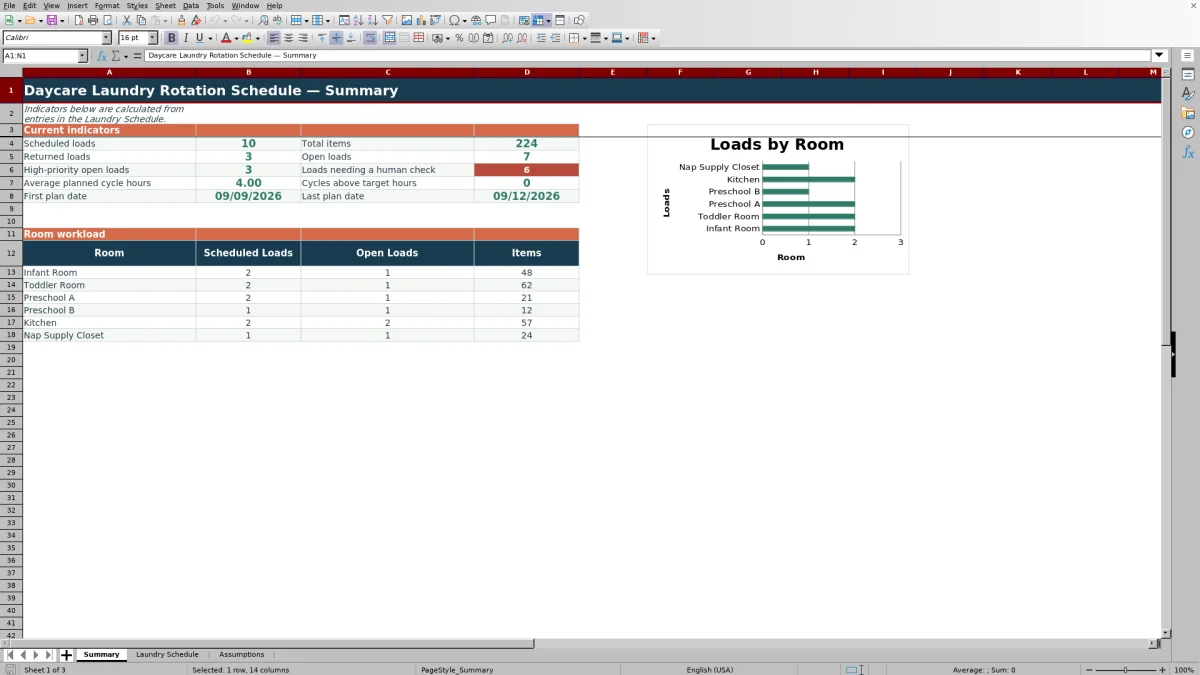
Summary counts scheduled loads, returned loads, open loads, high-priority open loads, items, and records needing review. It also reports average planned cycle hours, cycles above the target, first and last plan dates, and room-level scheduled loads, open loads, and item quantities. The room chart provides a quick workload view, while the underlying counts help supervisors decide where to check details in Laundry Schedule.
Comparison With Other Laundry-Tracking Methods
The workbook functions as a complete operational method by combining structured entry, milestone planning, status tracking, return recording, formula checks, assumptions, and summary reporting. The comparison below identifies when each option is more suitable without implying that one method fits every center.
| Method | What it provides | More suitable when | Main limitation to consider |
|---|---|---|---|
| This Excel workbook | Room-based load records, validated choices, four milestone times, statuses, cycle calculations, review alerts, and summary indicators. | A center uses Excel and wants a reusable schedule with structured checks but no external system. | Staff still need to update the file consistently and respond to alerts manually. |
| Paper checklist or whiteboard | A visible handwritten list that can be updated without a computer. | A small team handles few daily loads in one location and immediate shared visibility matters most. | Historical analysis, duplicate checking, cycle calculations, and room totals require manual work. |
| Blank spreadsheet | Flexible rows and columns designed from scratch by the operator. | The center needs unusual fields or a simple list and has staff available to build and maintain formulas and validation. | Checks, summaries, dropdowns, and calculations are not present unless someone creates them. |
| Dedicated childcare software | Depending on the product, centralized records, permissions, notifications, or broader operational modules. | A multi-site organization needs integrated workflows, user management, mobile access, or automated communication and has budget for setup and licensing. | Laundry-specific stages may require configuration, and available functions depend on the selected service. |
From Daily Results to the Next Decision
At the end of a shift, review open and high-priority loads first, then inspect alerts and cycles above the target. A repeated late-return pattern for one room may indicate unrealistic milestones, assignment conflicts, or load sizing that needs investigation. Update assumptions only when the center intends to change a general threshold or list; adjust individual schedule rows when the issue applies to a specific load. This keeps the next decision tied to observed results rather than to an isolated count.
Frequently asked questions
How many laundry loads can the Excel schedule hold?
The Laundry Schedule provides 100 entry rows, covering rows 4 through 103. Each row represents one planned load and includes calculated cycle hours and an alert formula.
Can I change the rooms, staff names, laundry types, priorities, and statuses?
Yes. The Assumptions sheet contains the lists used by the schedule’s dropdowns. The included names and records are fictional examples and should be replaced with the center’s operating choices.
What conditions can produce an alert?
The formulas can flag duplicate load IDs, incomplete schedules, quantities above the configured threshold, invalid milestone order, a missing actual return time, a return due soon, a past-due return, or a late completed return. These messages are prompts for human review, not external notifications.
How are planned cycle hours calculated?
The workbook calculates the elapsed hours from Collect By to Return By when the load ID and both times are present and the return time is not earlier than the collection time. The Summary compares calculated cycles with the target stored on Assumptions.
Does the workbook automatically notify staff when a load is late?
No. The Alert column and Summary provide formula-based indicators inside the XLSX. A staff member must open or review the workbook, investigate the record, and take the appropriate operational action.
Editorial responsibility

Lena MoralesEnrollment and classroom workflows

Jordan LeeWorkbook QA and center operations