This Excel workbook helps childcare-center operators catalog artwork, observation notes, artifact photos, writing samples, project records, and construction samples. The Evidence Index provides space for 100 entries, with one record per row organized by portfolio ID, evidence date, learning area, room, staff code, storage reference, and status.
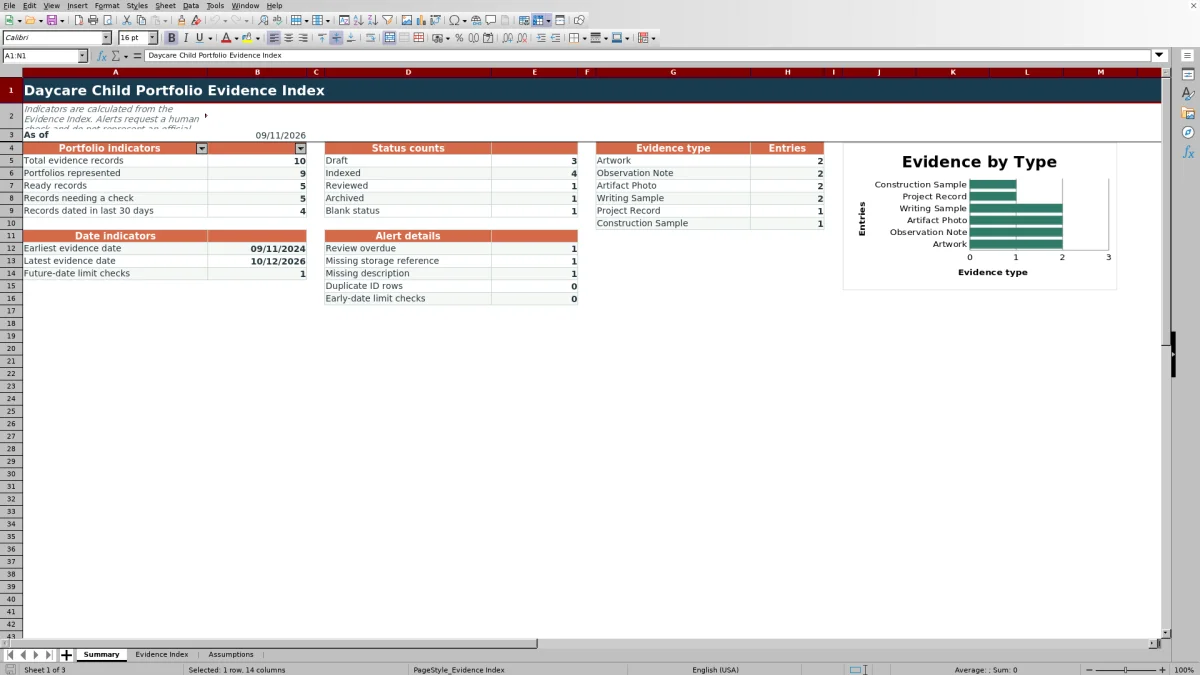
The Summary sheet calculates portfolio, status, evidence-type, date, and alert counts, while the Assumptions sheet holds editable review limits and dropdown choices. Review dates and check flags are human review prompts for internal organization; they do not establish an official record or compliance determination.
How this workbook can help
- Keeps classroom evidence references in a consistent index organized by portfolio ID and date.
- Helps staff locate physical or digital items by recording a storage reference for each entry.
- Surfaces duplicate IDs, missing details, date-limit concerns, and overdue reviews for staff follow-up.
- Summarizes record volume, represented portfolios, statuses, evidence types, date ranges, and alert details.
What is in the file
How to get started
1. Configure the workbook
Open the Assumptions sheet and review the local settings. Adjust the 30-day review interval, earliest evidence date, allowed future days, evidence types, learning areas, rooms, staff codes, and statuses to match center procedures.
2. Enter each evidence record
Use rows 5 through 104 of the Evidence Index. Assign a unique Evidence ID, enter the portfolio ID and evidence date, select the applicable dropdown values, and add a useful description and storage reference.
3. Resolve calculated prompts
Read the Review By and Check Flag columns after completing a row. Correct duplicate IDs, blank fields, dates outside the configured limits, missing storage references, or other displayed issues before relying on the entry.
4. Review the center-level picture
Open the Summary sheet to examine Summary indicators, including record and portfolio counts, statuses, evidence-type totals, date ranges, and alert details. Use filters on the Evidence Index when staff need to examine the underlying rows.
Situation: Classroom Evidence Is Stored in Several Places
A childcare center may keep artwork in binders, observation notes in class folders, and artifact photos in image folders. The workbook does not store those items inside the XLSX. Instead, it creates a searchable index linking each item to an evidence ID, portfolio ID, date, description, classroom context, and storage reference.
Action: Create a Consistent Evidence Record
Staff enter one item per row on the Evidence Index and use the supplied lists to classify it. Available evidence types are Artwork, Observation Note, Artifact Photo, Writing Sample, Project Record, and Construction Sample. The row can also identify a learning area, room, staff code, storage location, and workflow status.
Result: Review Dates, Flags, and Summary Counts
When an evidence ID and date are present, the workbook calculates a Review By date using the interval on the Assumptions sheet. The Check Flag column evaluates issues such as duplicate evidence IDs, missing portfolio IDs, missing dates or descriptions, absent storage references, blank statuses, dates outside the configured limits, and records requiring review. The Summary sheet then counts records, portfolios, statuses, evidence types, date indicators, and selected alerts.
Practical Example: From Artwork to the Next Review Decision
Situation: a teacher needs to catalog the fictional orange-and-blue sponge-print pattern shown in the sample data. Action: the teacher records EV-DEMO-001, SAMPLE-PORT-001, an evidence date of September 1, 2026, the Artwork type, Creative Arts learning area, room and staff codes, Binder A / Sleeve 01, and Indexed status. Result: with the default 30-day interval, the Review By formula returns October 1, 2026. Interpretation: the interpreted result is an internal reminder to revisit the indexed record, not a mandated deadline. Next decision: the operator reads the current Check Flag and either resolves its specific message or retains the completed row for routine portfolio tracking.
Interpretation: Read Indicators as Prompts, Not Judgments
A high alert count means staff should inspect the associated rows; it does not by itself show that a portfolio is incomplete or out of compliance. Likewise, the evidence-type chart shows how records are distributed across the configured types, but it does not measure the educational quality of an item. Operators should interpret counts alongside classroom practices and local recordkeeping procedures.
Errors and Solutions for Common Entry Problems
Read the flag before filing the item. For “Duplicate evidence ID,” assign a distinct ID to the affected record. For “Add portfolio ID,” “Add evidence date,” “Add description,” “Add storage reference,” or “Choose status,” complete the named field. For an early- or future-date warning, correct an entry error or revise the applicable Assumptions setting when local procedures permit that date. For an overdue review prompt, inspect the record and update its status according to the center’s process.
Comparison and Next Decision: Workbook or External Alternative
The appropriate method depends on record volume, access needs, available systems, and how much automation the center requires. This comparison treats the three-sheet workbook as one complete operational method rather than comparing its worksheets with one another.
| Method | How records are managed | More suitable when |
|---|---|---|
| Daycare Child Portfolio Evidence Index workbook | Combines a structured 100-row index, configurable lists and limits, calculated review prompts, check flags, filters, summary counts, and a chart in one XLSX. | More suitable when a center wants a locally maintained index with consistent fields and built-in checks but does not need evidence files embedded in the workbook. |
| Paper log | Records references by hand and requires staff to count statuses, types, dates, and issues manually. | More suitable when device access is unreliable, the record volume is low, and staff can maintain manual totals. |
| Blank spreadsheet | Allows free-form columns but requires the operator to design validation, formulas, alert logic, filters, and summaries. | More suitable when the center needs a short one-time list or has staff who plan to build and maintain their own controls. |
| Dedicated childcare software | May support broader workflows such as shared access, attached files, family communication, or integration with other center records, depending on the product. | More suitable when the center needs multiuser workflows or integrated services and can support the product’s cost, setup, and training requirements. |
Next decision: choose the workbook when its record capacity, reference-based storage model, and internal prompts fit the center’s process; choose an external alternative when device conditions, customization needs, or integrated operations point elsewhere.
Frequently asked questions
What records can the daycare child portfolio evidence index catalog?
The configured evidence types are Artwork, Observation Note, Artifact Photo, Writing Sample, Project Record, and Construction Sample. Operators can edit these source choices on the Assumptions sheet to reflect local procedures.
How many evidence records does the Excel workbook support?
The Evidence Index has 100 prepared record rows, spanning rows 5 through 104. Review By and Check Flag formulas are present throughout that range.
Are the calculated review dates official deadlines?
No. The Review By date adds the configured review interval to the evidence date and serves as an internal prompt. The workbook states that its alerts do not represent an official record or compliance determination.
Can a center change the dropdown choices and date limits?
Yes. The Assumptions sheet contains editable evidence types, learning areas, rooms, staff codes, statuses, the review interval, the earliest evidence date, and the number of allowed future days.
Does the workbook include a field for each child’s name?
No dedicated child-name column appears in the Evidence Index. Records are associated with a Portfolio ID, so the center should use an appropriate local identifier and follow its own information-handling procedures.
Editorial responsibility

Lena MoralesEnrollment and classroom workflows

Jordan LeeWorkbook QA and center operations