This preschool positive behavior tracker is an Excel workbook for recording center-defined positive-routine observations and classroom participation over time. Staff can document the date, child ID, room, routine, context, recognition count, staff label, review status, and a factual observation note for each entry.
Editable settings control the reporting dates, recognition-count limits, and classroom lists. Formulas then organize entries by week and indicate whether each date falls within the selected reporting window. The workbook supports recognition and administrative review; it is not a diagnostic or child-ranking tool.
How this workbook can help
- Creates a consistent row-level record of positive routines and classroom participation while allowing the center to define its own labels.
- Separates editable observation fields from calculated week-start and report-status fields.
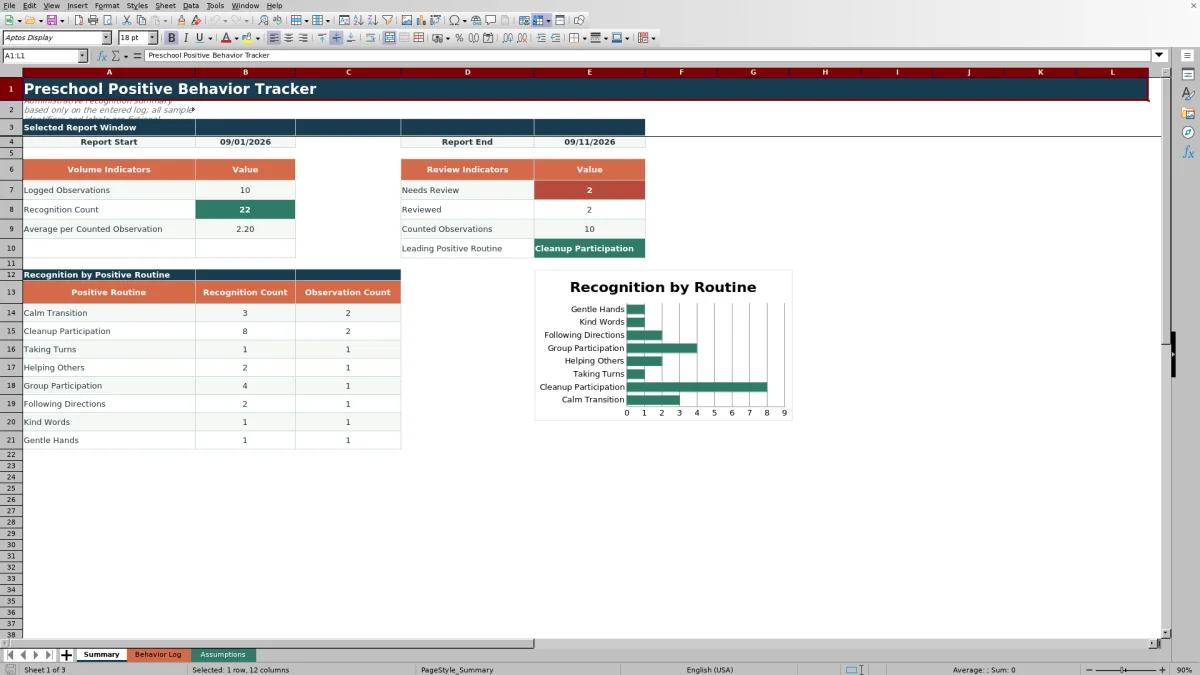
- Turns in-range log entries into recognition totals, observation counts, review-status counts, a leading-routine result, and a routine-level chart.
- Keeps reporting dates, recognition-count limits, routines, rooms, contexts, staff labels, and review statuses in one editable assumptions area.
What is in the file
How to get started
1. Configure the center settings
Open the Assumptions sheet. Set the reporting start and end dates, confirm the earliest and latest allowed entry dates, and review the minimum and maximum recognition counts. Replace the fictional routines, rooms, contexts, and staff labels with stable local choices.
2. Enter classroom observations
Use the Behavior Log to record one observation per row. Give each nonblank Entry ID a unique value, select the applicable routine and context, enter the recognition count, and write a neutral observation note.
3. Check calculated and review fields
Confirm the Week Start and Report Status after entering a date. Resolve invalid values, inspect entries marked Needs Review, and update the review status when the center's human review is complete.
4. Read the reporting results
Open the Summary sheet to review logged observations, recognition totals, counted observations, the average per counted observation, review counts, the leading positive routine, and the routine-level chart for the selected dates.
A structured classroom recognition record
The workbook organizes positive-routine observations into consistent fields instead of relying on disconnected notes. Its prepared log covers rows 6 through 105, while filters and frozen headers help staff work through the record. Yellow editable cells distinguish staff-entry areas from the calculated Week Start and Report Status columns.
The center determines what its routine labels mean. The supplied examples—including Calm Transition, Cleanup Participation, Taking Turns, and Helping Others—are editable choices rather than universal behavior standards.
How the reporting calculations work
The Summary uses the start and end dates stored on the Assumptions sheet. Logged Observations counts in-range rows with a nonblank Positive Routine, while Recognition Count sums recognition values for dated rows in the window. Counted Observations includes recognition values that fall between the configured minimum and maximum, and the average divides total recognition by that counted-observation total when a valid denominator exists.
Needs Review and Reviewed totals use the corresponding labels from the Assumptions sheet. Routine rows show both recognition totals and observation counts, and the leading-routine result returns the listed routine with the highest recognition total in the report period.
Practical example: from observation to next decision
Situation: A Helping Others observation dated September 3, 2026 falls inside the sample reporting window of September 1 through September 11. Action: A staff member records the fictional entry, assigns a recognition count of 2, selects Reviewed, and notes that art supplies were returned to the labeled shelf. Result: The row receives a Week Start of August 31, 2026 and an In Report status; it contributes one observation and two recognition counts to Helping Others, as well as one Reviewed entry. Interpretation: the result shows that one specific routine was observed and recognized twice in that recorded situation; it does not establish a permanent trait or a conclusion about the child. Next decision: Continue recording comparable observations and review whether the pattern appears across dates and contexts before changing classroom supports or recognition practices.
Common entry errors and solutions
Error-to-solution checks help keep the report usable. If a nonblank Entry ID duplicates another ID, assign a unique value. If a date falls outside the allowed entry boundaries, correct the date or deliberately revise those boundaries on the Assumptions sheet. If a valid date shows Outside Report, decide whether the reporting window should change or whether the entry should remain as historical information.
A recognition count outside the configured whole-number limits should be corrected or matched to an intentional settings change. If a room, routine, context, staff label, or review status is unavailable in its list, update the center-defined list before recording the value. When summary results are blank or unexpectedly low, check the reporting dates, nonblank routine field, recognition value, and row-level Report Status.
Comparison of positive behavior tracking methods
This Excel workbook is one complete operational method: configure center-defined settings, enter structured observations, check calculated statuses, review flagged records, and read date-range summaries. The alternatives below involve different levels of setup, manual work, and infrastructure.
| Method | Setup and daily capture | Review and reporting | More suitable when |
|---|---|---|---|
| This configured Excel workbook | Staff maintain defined lists and enter one structured observation per prepared row. | Formulas calculate week and report status; the Summary produces date-range indicators, routine totals, and a chart. | More suitable when a center wants a file-based Excel process with consistent fields and a prepared summary for up to 100 entries. |
| Paper observation log | Staff handwrite entries without requiring a device. | Counts, status reviews, and routine comparisons must be completed manually. | More suitable when devices are unavailable at the point of observation or the center intentionally uses a short, low-volume paper workflow. |
| Blank spreadsheet | Staff design all columns, lists, validations, formulas, and reporting logic. | Reporting depends on what the local designer builds and maintains. | More suitable when the center needs a substantially different data model and has someone able to create and test spreadsheet controls. |
| Dedicated childcare software | Staff use a vendor-managed application, often with accounts and platform-specific entry screens. | Available reports, permissions, integrations, and retention controls depend on the selected service. | More suitable when a larger or multi-site program needs managed user access, integrations, mobile workflows, or centralized administration. |
The choice should reflect observation volume, staff access, privacy requirements, reporting needs, and the center's capacity to maintain either a file or a software service.
Interpreting the Summary responsibly
A higher recognition total can reflect more observations, larger counts per observation, or both. The workbook therefore shows recognition and observation counts side by side for each listed routine. Staff should also consider differences in attendance, room schedules, observation opportunities, contexts, and recording practices before drawing operational conclusions.
The leading routine identifies the first listed routine associated with the highest recognition total; it does not measure child development or prove that one classroom practice caused the result. Use the output to guide human review, recognize documented participation, and decide where additional observation may be useful.
Privacy and local implementation
The included child IDs, rooms, staff labels, and sample notes are fictional. Before local use, decide which identifiers are necessary, where the XLSX will be stored, who may access it, and how long records should be retained under the center's policies and applicable requirements.
Observation notes should describe what was seen in neutral language. Avoid diagnoses, permanent labels, unsupported motives, or comparisons among children. Entries marked Needs Review should receive a documented human check before the information is used for classroom planning.
Frequently asked questions
Can the fictional routines, rooms, and staff labels be replaced?
Yes. The Assumptions sheet provides editable lists for up to eight positive routines, four rooms, eight contexts, five staff labels, and three review statuses. Update those visible lists so the Behavior Log choices reflect stable center practice.
How many observations can the prepared workbook hold?
The Behavior Log contains 100 prepared entry rows, from row 6 through row 105. Those rows already include the formula columns and validation ranges; adding rows beyond that range would require extending the relevant formulas, validations, filters, and summary references.
Which entries are included in the Summary?
The Summary evaluates dates from the reporting start through the reporting end, inclusive. Individual indicators apply additional conditions: Logged Observations requires a nonblank Positive Routine, status indicators require the matching review label, and Counted Observations requires a recognition value within the configured limits.
What should staff do with an entry marked Needs Review?
A designated staff member should check the date, selected labels, recognition count, and factual observation note, then update the status according to the center's review process. The Summary counts Needs Review and Reviewed entries separately within the selected date range.
Does this tracker diagnose behavior or evaluate child development?
No. It records center-defined positive-routine observations and recognition counts for administrative review. Results should be interpreted alongside observation opportunities and classroom context, not used as a diagnosis, developmental assessment, permanent label, or ranking of children.
Editorial responsibility

Lena MoralesEnrollment and classroom workflows

Jordan LeeWorkbook QA and center operations