This daycare enrichment calendar is an Excel workbook for scheduling visiting programs and center-led enrichment sessions by date, time, and room. Its Calendar sheet provides 100 rows for recording programs, categories, staff, providers, planned attendance, costs, statuses, and notes while supporting room-and-date planning.
The XLSX also includes a Summary dashboard and an editable Assumptions sheet. Room capacity, session hours, and scheduling messages calculate automatically, but each alert remains a human review prompt rather than an operational approval.
How this workbook can help
- Keep room bookings, session times, staff assignments, providers, attendance plans, costs, and statuses in one schedule.
- Reduce inconsistent entries with validation for unique session IDs, dates, times, categories, rooms, staff, attendance, costs, and statuses.
- Identify incomplete entries, invalid timing, capacity concerns, and other scheduling conditions that need staff review.
- Monitor non-canceled sessions through summary counts for upcoming activity, categories, planned child-spots, estimated costs, and scheduled hours.
What is in the file
How to get started
1. Configure the planning lists
Open Assumptions and update the rooms, capacities, categories, statuses, staff assignments, date limits, time limits, attendance limit, cost limit, and planning horizon. Use the yellow input cells for local planning choices.
2. Enter each enrichment session
On Calendar, assign one unique session ID per row and enter the date, start and end times, program, category, room, lead staff, planned children, status, and other applicable details. The sheet supports rows 5 through 104.
3. Review calculated fields and alerts
Confirm that Room Capacity matches the selected room and that Hours reflects the scheduled duration. Read the Scheduling Check result, then correct missing fields, invalid values, capacity issues, or schedule conflicts before relying on the entry.
4. Use the summary to make the next decision
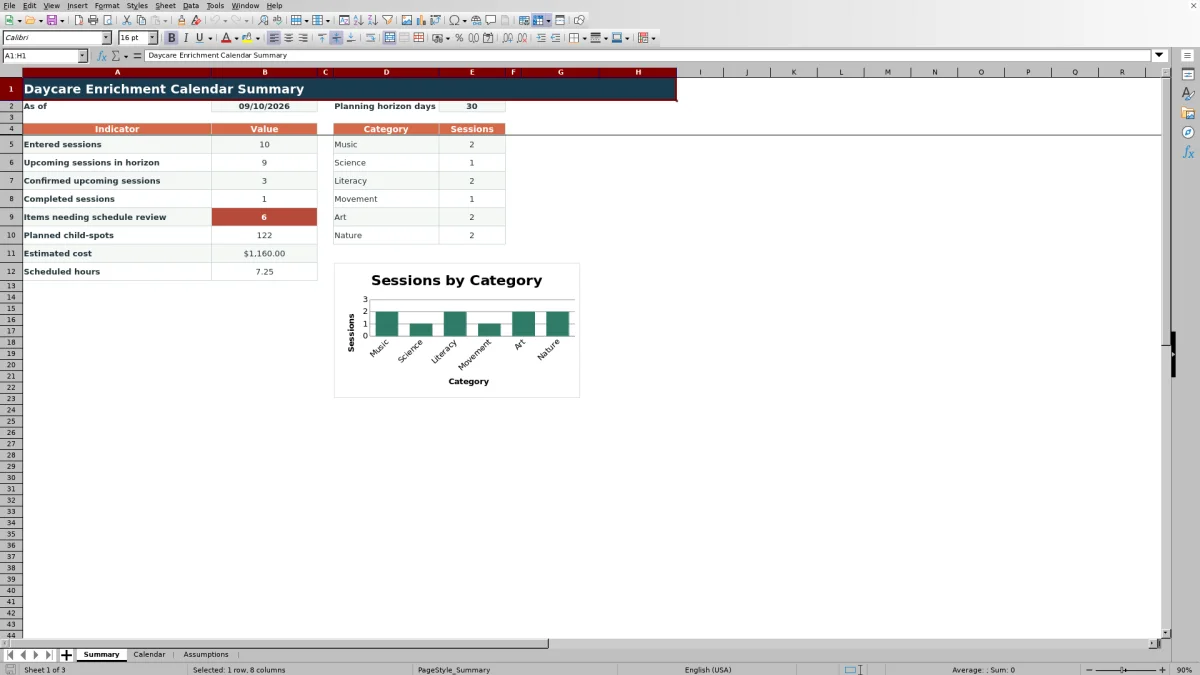
Review upcoming and confirmed sessions, completed activity, items needing attention, child-spots, costs, hours, and category counts. Filter Calendar when staff need to examine a particular room, date, category, or status.
Situation: Coordinating Enrichment Across Rooms and Dates
Visiting programs and center enrichment sessions create a shared scheduling problem: operators need to coordinate rooms, times, staff, attendance, provider details, costs, and session status without losing the context behind each booking. The workbook creates a single operating view while retaining notes for setup instructions or follow-up details.
Action: Set Local Rules Before Scheduling
Begin on Assumptions rather than typing directly over calculated fields. The supplied lists contain six rooms with capacities, six enrichment categories, five statuses, six fictional staff labels, and planning limits for dates, times, attendance, cost, and the summary horizon. Replacing these editable examples with the center's own planning choices makes the Calendar lists and room-capacity lookups relevant to daily operations.
Result: Review the Schedule and Summary Together
After sessions are entered, Calendar calculates room capacity and duration and produces a scheduling message for each populated row. Summary counts entered, upcoming, confirmed upcoming, and completed sessions; identifies items needing review; and totals planned child-spots, estimated cost, and scheduled hours. Its category counts and chart exclude canceled sessions, as do the upcoming and total measures that rely on session status.
Interpretation: Practical Room-Conflict Example
The sample schedule places ENR-001, Rhythm Rainbow, in Sunflower Room on September 14, 2026, from 9:00 to 9:45 a.m. for 12 children. ENR-002, Puppet Story Circle, uses the same room from 9:30 to 10:15 a.m. for 10 children. Each group is individually below the room's listed capacity of 16, but the times overlap.
The interpreted result is that capacity per session does not resolve simultaneous room use. Staff should review the conflict, move one session to another available room, or change a time. The revised row can then be checked again before its status is advanced.
Errors and Solutions for Common Schedule Entries
A “Check required fields” result calls for completing the date, start, end, program, category, room, lead staff, planned children, and status. A date or time warning calls for entering valid Excel date and time values within the Assumptions limits and making the end later than the start. A children-or-room issue calls for reselecting a listed room, confirming its capacity, and correcting the planned attendance. Duplicate session IDs should be replaced with unique values. Treat every message as a review cue, and retain Canceled only when cancellation is intentional because canceled rows are omitted from several summary measures.
Comparison: Excel Calendar, Paper Scheduling, and Childcare Software
The appropriate method depends on schedule volume, staff workflow, and the need for broader system connections. This comparison treats the workbook as one complete method rather than comparing its worksheets with one another.
| Method | Entry controls and review | Reporting | More suitable when |
|---|---|---|---|
| This Excel workbook | Uses configured lists, numeric limits, unique-ID validation, calculated capacities and hours, and row-level scheduling checks. | Provides eight indicators, category counts, and one chart for up to 100 session rows. | More suitable when a center wants a transparent, locally editable schedule without implementing a larger platform. |
| Paper or manual calendar | Relies on staff to check completeness, room capacity, duplicate bookings, and timing manually. | Requires hand counts and separate cost or attendance calculations. | More suitable when activity is infrequent, only a few people maintain the calendar, and automatic totals are unnecessary. |
| Dedicated childcare software | Controls vary by product and may include permissions, notifications, enrollment records, or integrated staffing workflows. | May provide broader operational reporting and system integrations. | More suitable when the organization needs multi-site access, parent communication, permissions, or integration with other childcare records. |
The workbook remains limited to its configured lists, formulas, and 100 schedule rows; it does not provide the broader workflows that some dedicated systems may offer.
Next Decision: Resolve Reviews and Confirm the Plan
Once entries are complete, filter Calendar for rows that still need attention and resolve them with the responsible room or program lead. Then use session status to distinguish planned, confirmed, completed, canceled, and on-hold work. The next scheduling decision should follow staff review of room availability, attendance, timing, supervision, and applicable center requirements rather than relying on a formula alone.
Frequently asked questions
How many enrichment sessions can the Excel calendar hold?
The Calendar sheet provides 100 session-entry rows, from row 5 through row 104. Each row includes formulas for room capacity, hours, and the scheduling check.
Can the rooms, capacities, categories, staff, and statuses be changed?
Yes. These lists are stored in editable cells on the Assumptions sheet. Keep room names aligned with their capacities because the Calendar uses that two-column list for its capacity lookup.
Which fields are required for the scheduling check?
For a populated session row, the check expects a date, start time, end time, program, category, room, lead staff, planned children, and status. The unique session ID identifies the row, while provider, estimated cost, and notes can be entered when applicable.
How are canceled sessions treated in the summary?
Canceled sessions are excluded from upcoming-session counts, category counts, planned child-spots, estimated cost, and scheduled hours. A canceled row can remain on Calendar as a record of the change.
Does the workbook replace licensing, staffing, or safety review?
No. Its formulas and validations support planning and identify entries for review, but operators still need to apply current supervision, staffing, licensing, accessibility, room-use, and safety requirements.
Editorial responsibility

Lena MoralesEnrollment and classroom workflows

Jordan LeeWorkbook QA and center operations