The Daycare Parent Conference Schedule is an Excel workbook for organizing appointment dates, times, rooms, staff owners, meeting formats, family responses, and follow-up status. It gives childcare-center operators one structured place to manage conference scheduling without treating administrative notes as child-development or clinical records.
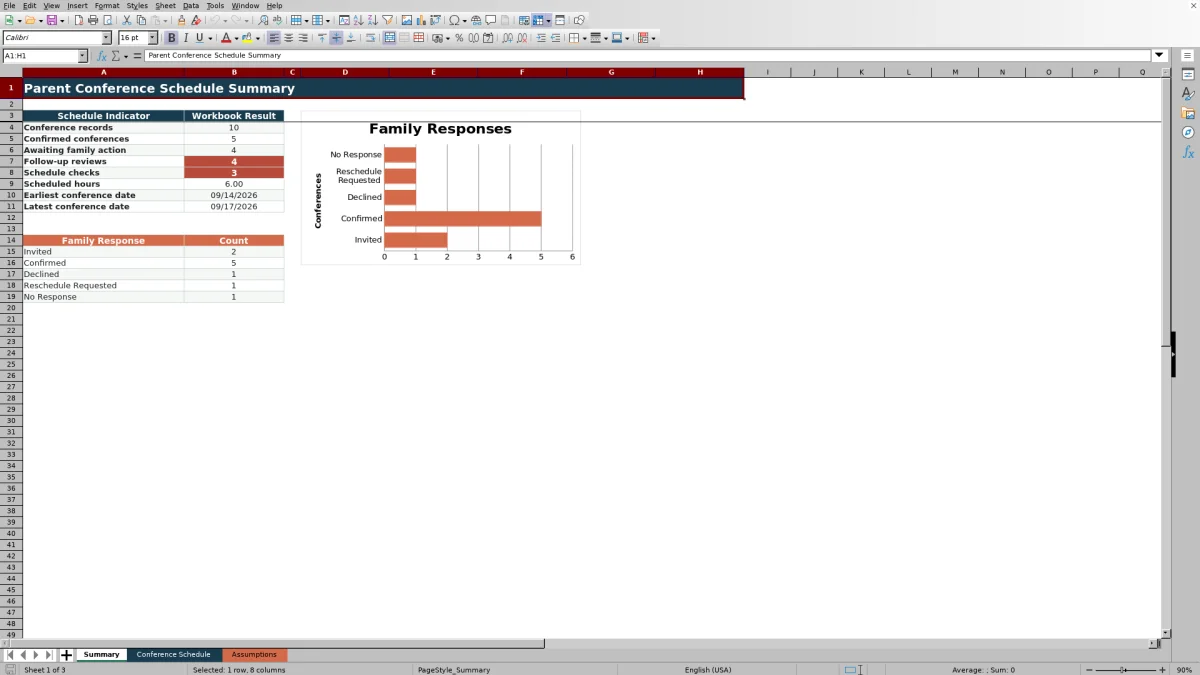
The XLSX accommodates 100 conference records and includes validated entry fields, calculated durations, schedule and follow-up checks, editable assumptions, summary indicators, and a family-response chart. Fictional demonstration entries show how the schedule works and should be replaced with center-approved administrative information.
How this workbook can help
- Keeps conference slots, family references, rooms, staff owners, meeting formats, responses, and follow-up details in one schedule.
- Helps staff identify incomplete records, duplicate conference IDs, scheduling-limit issues, and follow-up items that need review.
- Provides current totals for conference records, confirmations, families awaiting action, scheduled hours, and date range.
- Uses editable date, time, duration, room, staff, format, response, and follow-up settings to support a center's approved scheduling process.
What is in the file
How to get started
1. Review the scheduling assumptions
Open the Assumptions sheet and verify the earliest and latest dates, allowable start and end times, maximum conference hours, rooms, staff owners, meeting formats, family responses, and follow-up choices.
2. Enter each conference slot
On the Conference Schedule sheet, replace the fictional demonstration records with a unique conference ID, family reference, date, start and end times, room, staff owner, meeting format, family response, follow-up status, and appropriate administrative notes.
3. Update responses and follow-up
Use the approved dropdown choices to record whether a family is invited, confirmed, declined, requesting a new time, or has not responded. Update the follow-up status as work moves from pending to completed or is determined not to be needed.
4. Review checks and choose the next action
Read the calculated duration and the Schedule Check and Follow-Up Check results for each active row. Correct incomplete or invalid entries, contact families whose records require follow-up, and use the Summary sheet to decide where staff attention is needed next.
A Structured Conference Scheduling Method
Each Conference Schedule row connects a family reference and unique conference ID with the appointment date, start and end times, room, staff owner, meeting format, response, follow-up status, and administrative notes. Duration Hours, Schedule Check, and Follow-Up Check are calculated alongside those entries, so an operator can move from booking the slot to reviewing its administrative status without maintaining separate lists.
Practical Example: From Invitation to Next Decision
Situation: A fictional family is assigned a September 14 conference from 10:00 AM to 10:45 AM in the Green Room, owned by Demo Educator B, with Phone selected as the format. The response is Invited and follow-up is Pending. Action: The operator enters those details and reviews the calculated fields. Result: The duration calculates to 0.75 hours, and the Follow-Up Check identifies the row for follow-up review. Interpretation: The slot is recorded, but the invitation has not become a confirmed conference and the related follow-up is not complete. Next decision: Staff can contact the family, then update Family Response and Follow-Up Status to reflect the actual outcome.
Understanding Family Response and Follow-Up Results
The available family responses are Invited, Confirmed, Declined, Reschedule Requested, and No Response. On the Summary sheet, Awaiting family action combines Invited, Reschedule Requested, and No Response records, while Confirmed conferences are counted separately. For responses that still require family action, a follow-up status other than Completed causes the row to display Review follow-up; this helps the operator distinguish a booked record from one that still needs administrative attention.
Common Scheduling Errors and Solutions
Error: Schedule Check reports missing fields. Solution: complete the required information from Conference ID through Follow-Up Status. Error: a duplicate conference ID is reported. Solution: assign a unique ID to each conference record. Error: an entry conflicts with the configured scheduling range or duration limit. Solution: correct the date or time, or revise the approved limit on the Assumptions sheet before using the record. Error: Follow-Up Check continues to show Review follow-up. Solution: verify the family's response, complete the necessary contact, and update the follow-up status to match what occurred.
Comparison With Paper, Blank Spreadsheets, and Childcare Software
The appropriate method depends on the center's workflow, staffing, and need for connected services. This workbook is a structured XLSX process; it does not provide family self-booking, automated reminders, calendar synchronization, or messaging.
| Method | What it provides | More suitable when |
|---|---|---|
| This Excel workbook | Validated schedule entries, editable assumptions, calculated durations, record checks, follow-up checks, summary metrics, and a response chart for up to 100 records. | More suitable when a center wants a reusable file-based process and can update family responses and follow-up manually. |
| Paper calendar or manual log | A simple offline record without formulas, validation, automatic counts, or calculated checks. | More suitable when a very small team needs a temporary paper schedule and accepts manual counting and review. |
| Blank spreadsheet | An unrestricted grid that staff must design, validate, calculate, and maintain themselves. | More suitable when the center needs a highly customized layout and has someone able to build and test the spreadsheet logic. |
| Dedicated childcare software | May include hosted family access, online booking, reminders, messaging, permissions, or calendar integrations, depending on the product. | More suitable when those connected services are required and the center is prepared to evaluate cost, privacy, setup, and staff training. |
The workbook is therefore most appropriate as an internal administrative schedule when its documented Excel controls match the center's operating needs.
Configure the Workbook Before Routine Use
The Assumptions sheet initially allows dates from September 10, 2026, through September 10, 2027; times from 7:30 AM through 6:00 PM; and a maximum conference length of one hour. It also contains the approved response, follow-up, format, room, and staff-owner choices used by the schedule. Operators should review these values before entering live records and change them only to center-approved administrative settings.
Use Summary Results to Guide Daily Work
The Summary sheet reports total conference records, confirmed conferences, families awaiting action, follow-up reviews, schedule checks, total scheduled hours, and the earliest and latest conference dates. Response counts and the chart provide a quick distribution view. These results should be interpreted as workflow indicators: a high awaiting-action count suggests outreach is the next priority, while schedule checks indicate records that should be corrected before staff rely on the schedule.
Frequently asked questions
What information can the daycare parent conference schedule track?
It tracks conference IDs, family references, dates, start and end times, rooms, staff owners, meeting formats, family responses, follow-up statuses, and administrative notes. It also calculates duration and produces schedule and follow-up checks.
How many conference records can the Excel workbook hold?
The prepared Conference Schedule entry area runs from row 5 through row 104, providing space for 100 conference records with formulas and validation already applied.
Does the workbook send invitations or appointment reminders?
No. The workbook records response and follow-up information, but it does not send email, text messages, calendar invitations, or automated reminders. Staff must perform outreach through the center's approved communication process.
What causes a record to require review?
Schedule Check can identify incomplete required fields, duplicate conference IDs, and entries that conflict with configured scheduling limits. Follow-Up Check identifies invited, reschedule-requested, or no-response records whose follow-up has not been marked Completed.
Can the center change the scheduling limits and approved choices?
Yes. The Assumptions sheet contains editable earliest and latest dates, allowable times, maximum conference hours, and the listed choices for responses, follow-up statuses, meeting formats, rooms, and staff owners. Review those cells before routine use so the schedule reflects center-approved settings.
Editorial responsibility

Lena MoralesEnrollment and classroom workflows

Jordan LeeWorkbook QA and center operations