This Excel workbook is a daycare transportation authorization tracker for recording family decisions about transportation services, assigned routes, and authorization start and end dates. The Authorizations sheet supports 100 records and includes fields for child and guardian record IDs, room, service, route, authorization date, decision, and transport notes.
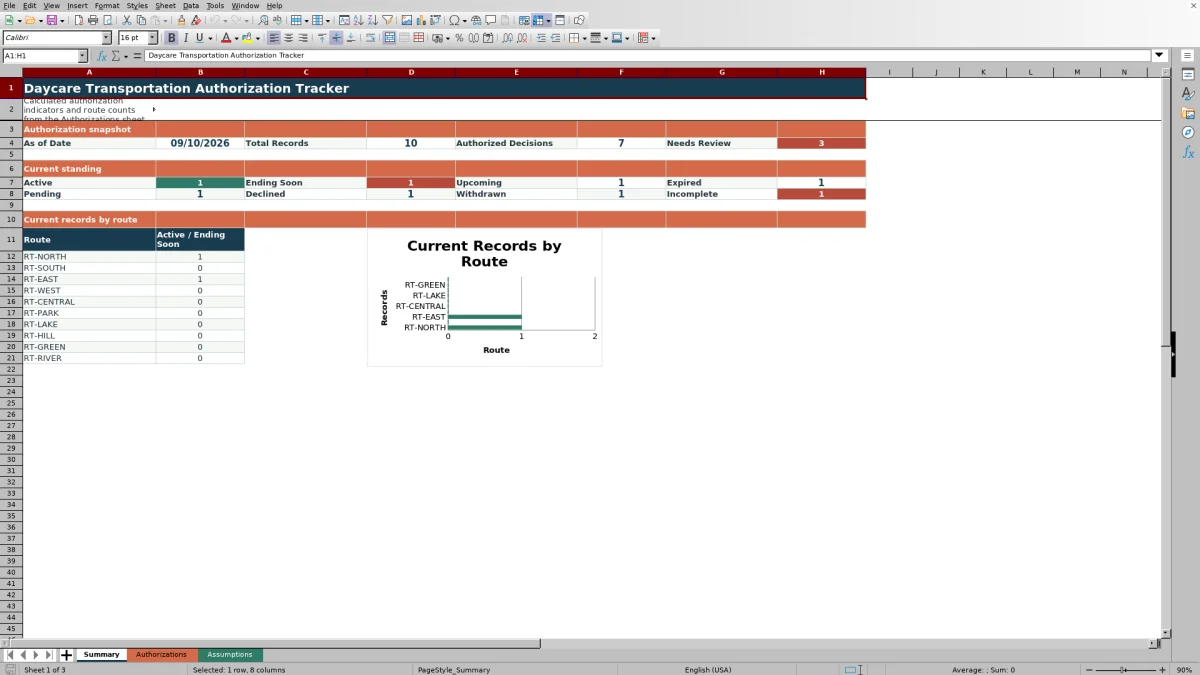
Calculated columns look up the route lead, check IDs and dates, classify each record's current standing, and show days remaining when applicable. The Summary sheet reports decision and standing counts, highlights records needing review, and shows Active or Ending soon records by route. Staff should use these indicators to support—not replace—review of the family's authorization and the center's transportation procedures.
How this workbook can help
- Keeps family transportation decisions, routes, services, and active dates in one structured record.
- Identifies incomplete entries, duplicate authorization IDs, and date sequences that require staff review.
- Shows current authorization standing and route-level counts using a configurable reporting date.
- Lets center staff maintain approved decisions, routes, route leads, rooms, and transport services on the Assumptions sheet.
What is in the file
How to get started
1. Confirm the reporting settings
Open the Assumptions sheet and verify the As of Date in B3 and the Ending Soon Window in B4. Review the decision, route, route lead, room, and transport service lists before entering records.
2. Enter each family authorization
Use one row per authorization on the Authorizations sheet, from rows 5 through 104. Complete the authorization, child, and guardian record IDs; select the room, service, route, and decision; enter the three dates; and add concise transport notes when needed.
3. Resolve calculated warnings
Review Route Lead ID, Record Check, Current Standing, and Days to End. Investigate duplicate IDs, missing or invalid dates, reversed date ranges, authorization dates after service starts, incomplete required fields, and routes that return Check route.
4. Review the operational summary
Use the Summary sheet to examine total records, authorized decisions, records needing review, standing counts, and Active or Ending soon records by route. Decide which families or staff members require follow-up, then update the source authorization row rather than typing over calculated cells.
What the daycare transportation tracker records
Each row creates a single operational record containing an Authorization ID, Child Record ID, Guardian Record ID, room, transport service, route, start date, end date, authorization date, family decision, and transport notes. The workbook then looks up the Route Lead ID and calculates Record Check, Current Standing, and Days to End. Drop-down lists reduce variations in room, service, route, and decision entries, while the filter on A4:O104 helps staff narrow the list for daily review.
How record checks and current standing work
The formulas provide review prompts, not legal approval. Record Check identifies duplicate authorization IDs, missing dates, nonnumeric date entries, an end date before the start date, or an authorization date after transportation begins. Current Standing returns Incomplete when a required field is blank and Review when Record Check is not OK. A complete Authorized record becomes Upcoming, Expired, Ending soon, or Active according to the As of Date and ending-soon window. Pending, Declined, and Withdrawn decisions retain those labels.
Practical example: an authorization ending soon
Situation: The fictional AUTH-0002 record authorizes afternoon drop-off on RT-EAST from August 21 through September 24, 2026, with an authorization date of August 11. The workbook's As of Date is September 10 and its ending-soon window is 14 days. Action: Staff enter the IDs, room, service, route, dates, Authorized decision, and note in one row. Result: The route lookup returns STAFF-203, Record Check returns OK, Current Standing returns Ending soon, and Days to End returns 14. Interpretation: The date sequence passes the workbook's checks, but the service period has reached the follow-up window; the record also contributes to the Ending Soon total and the RT-EAST route count. Next decision: Staff should consult the family's documentation and center procedures to determine whether to renew, change, or conclude transportation, then update the record accordingly.
Common entry errors and solutions
A duplicate authorization ID should be compared with the underlying records; correct a typing error or assign a unique ID rather than deleting a legitimate authorization. For Missing date or Check date, enter the documented dates as valid Excel dates. For End before start or Authorization after start, use the correct source record to verify whether a date was entered incorrectly or requires operational review. Incomplete means at least one required field from Child Record ID through Decision is blank. If Route Lead ID displays Check route, correct the route entry or update the paired route and lead values on the Assumptions sheet.
Comparison with other transportation tracking methods
The workbook functions as one complete operational method: structured entry, controlled lists, route-lead lookup, date and ID checks, standing calculations, summary counts, and a route chart. The appropriate choice depends on record volume, access requirements, and the center's existing systems.
| Method | What it provides | Limitations | More suitable when |
|---|---|---|---|
| This Excel workbook | Structured authorization records, drop-down lists, calculated checks and standing, summary metrics, and route counts for up to 100 prepared rows. | Staff must maintain the assumptions, protect the file, review warnings, and extend formulas and controls if records go beyond row 104. | More suitable when a center already uses Excel and needs a defined single-file process without broader software integration. |
| Paper or manual log | A familiar physical process that can accompany signed family documents. | Status changes, expiration reviews, and route totals require manual counting and repeated checking. | More suitable when record volume is very low, computer access is limited, or policy requires a paper-centered workflow. |
| Blank spreadsheet | An open grid that staff can customize without adopting preset fields or formulas. | It does not supply the tracker's validation lists, checks, standing logic, summary metrics, or route chart unless staff build them. | More suitable when the center's workflow differs substantially from the supplied structure and someone can design and maintain the controls. |
| Dedicated childcare software | Depending on the product, it may offer permissions, shared access, family records, notifications, and integrations. | Capabilities vary and may involve subscription costs, setup, training, migration, and vendor-controlled configuration. | More suitable when the center needs multiuser access, system integrations, centralized permissions, or vendor support beyond a standalone XLSX. |
The comparison is operational rather than a claim that one method fits every center. Staff should evaluate privacy controls, required approvals, user access, record volume, and how transportation data connects with enrollment procedures.
How to interpret the Summary sheet
Total Records counts nonblank Authorization IDs, while Authorized Decisions counts rows whose Decision is Authorized regardless of whether they are Active, Upcoming, Ending soon, or Expired. Needs Review combines Current Standing values of Review and Incomplete. Route totals and the chart include only Active and Ending soon records, so they should not be read as every authorization ever assigned to a route. Staff can use these distinctions to move from a broad count to the specific rows requiring action.
Capacity, list maintenance, and record handling
The prepared formulas, validation, filters, and summary references cover Authorizations rows 5 through 104. Adding records below row 104 requires extending the related formulas, validation ranges, formatting, summary references, and chart inputs. The choice lists also use fixed ranges on the Assumptions sheet, including ten routes with paired lead IDs, eight rooms, five transport services, and four decisions. Because transportation records can contain sensitive identifiers and notes, centers should store the XLSX according to their access, retention, and privacy procedures.
Frequently asked questions
Does this tracker replace a signed family transportation authorization?
No. The workbook records and monitors authorization details, but its calculated checks and standing labels are review aids. Keep and verify the family's authorization documentation according to the center's policies and applicable requirements.
How many transportation authorization records are prepared?
The Authorizations sheet provides 100 prepared record rows, from row 5 through row 104. Records added beyond that range will not automatically be included in the existing formulas, validation, summary calculations, formatting, or route chart.
How does the workbook decide that an authorization is Ending soon?
For a complete Authorized record that passes Record Check, the workbook compares the end date with the As of Date in Assumptions!B3. It returns Ending soon when the end date is on or before the As of Date plus the number of days entered in Assumptions!B4. The supplied window is 14 days.
What is the difference between Review and Incomplete?
Incomplete means at least one required field from Child Record ID through Decision is blank. Review means the required fields are present, but Record Check found a duplicate Authorization ID or a missing, invalid, or illogical date sequence. The Summary sheet combines both labels in Needs Review.
Can the routes, rooms, services, and decisions be changed?
Yes. These lists are maintained on the Assumptions sheet. Keep each route paired with the correct Route Lead ID, and remain within the existing list ranges unless the workbook's validation formulas, lookups, summary references, and chart ranges are also updated.
Editorial responsibility

Lena MoralesEnrollment and classroom workflows

Jordan LeeWorkbook QA and center operations