This daycare classroom transition schedule is an Excel workbook for coordinating children’s moves between rooms. It provides space to record current and destination rooms, responsible coordinators, target dates, classroom visits, family notice, status, completion dates, and plan notes.
The XLSX also calculates days to target, visits logged, and prompts for possible scheduling, visit, or notice issues. These indicators support planning, but planning prompts require human review before staff finalize a move or determine whether it follows center policy.
How this workbook can help
- Keeps target dates, classroom visits, family notice, status, and completion details together for each planned move.
- Surfaces missing information and possible timing issues through visit, notice, and schedule-review prompts.
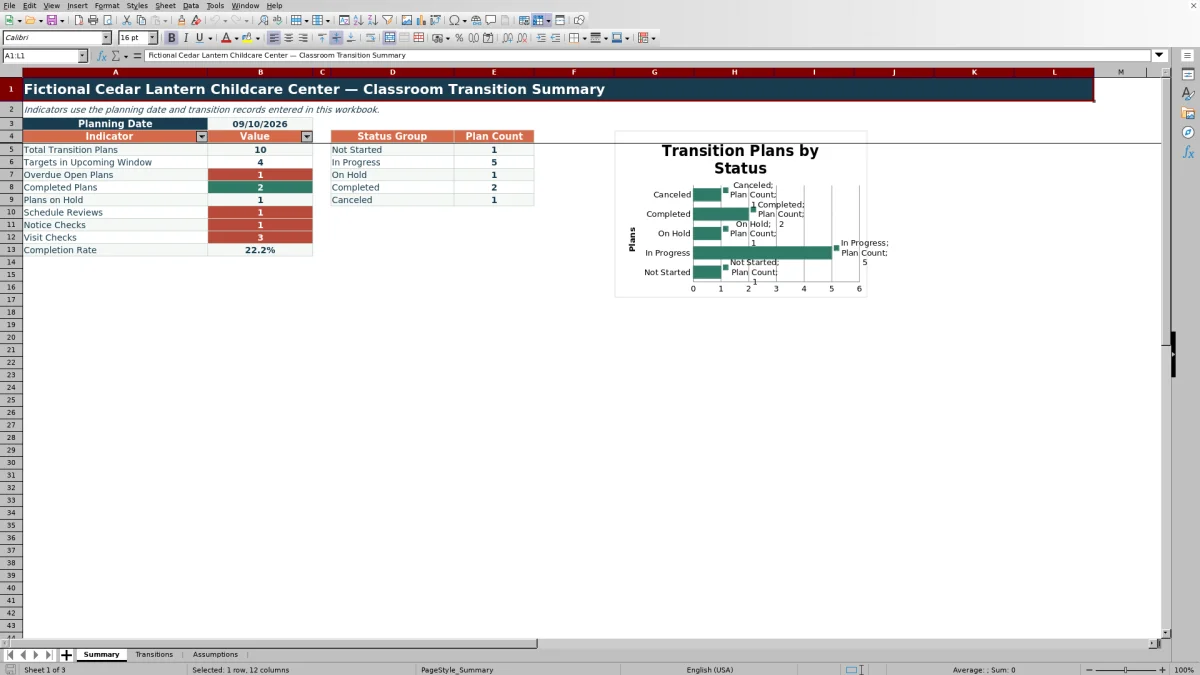
- Shows upcoming targets, overdue open plans, completed plans, holds, cancellations, and completion rate on a summary sheet.
- Lets the center adjust room labels, expected visits, coordinators, notice lead time, and the upcoming planning window.
What is in the file
How to get started
1. Set the planning assumptions
Open the Assumptions sheet and replace the fictional room and coordinator labels. Review the expected visits for each destination room, planning date, minimum notice lead days, and upcoming-window days. These are editable planning assumptions, not outside requirements.
2. Create each transition record
On the Transitions sheet, use one row per child move. Enter the transition ID, child record ID, current room, destination room, coordinator, request date, target move date, and initial status.
3. Record visits and family notice
Add Visit 1 Date, Visit 2 Date, and Family Notice Date as activities occur. Update the status from Not Started through the appropriate planning stage.
4. Review the workbook prompts
Check Days to Target, Visits Logged, Visit Check, Notice Check, and Schedule Check. Treat the calculated checks as reminders to investigate missing entries, date order, visit expectations, and notice timing.
5. Close or revise the plan
When the move occurs, select Completed and enter the completion date. Use On Hold or Canceled when applicable, then review the Summary sheet to decide which open plans need attention next.
Coordinate the Full Classroom Move
The workbook keeps the main stages of a classroom move in a single operational record: the request, current and destination rooms, target move date, classroom visits, family notice, status, notes, and completion. A coordinator can use the status choices Not Started, Visits Scheduled, Family Notified, Ready to Move, Completed, On Hold, or Canceled to show where each plan stands.
Use Dates and Checks Together
Dates provide the schedule, while the calculated columns help staff interpret it. Days to Target compares the target date with the planning date. Visits Logged counts the two visit-date fields. Visit Check compares that count with the expected visits assigned to the destination room, and Notice Check reviews the recorded notice date against the target date and editable lead-time setting.
Practical Classroom Transition Example
Situation: in the included fictional example, child record FIC-CH-102 is scheduled to move to Fictional Early Preschool A on September 20, 2026, with one visit recorded and family notice dated September 1. Action: the coordinator reviews the row against the September 10 planning date, the 14-day upcoming window, the two expected visits for that room, and the seven-day notice setting. Result: the plan falls within the upcoming window, Visits Logged shows one, Visit Check calls for another visit, and the notice timing meets the entered lead-time assumption. Interpretation: family notice is not the immediate issue, but visit preparation is incomplete. Next decision: schedule and record the second visit before moving the plan to Ready to Move.
Common Errors and Solutions
A Check room result can occur when the destination room is blank or does not match the Assumptions list; select a listed destination or update the room list. Check target means a target date is needed before timing can be evaluated. Check visits means the logged dates do not yet meet the destination room’s expected count. Check notice, Check lead, or Check sequence indicates that staff should add the notice date or review its relationship to the target date. A Schedule Check beginning with Review can identify missing rooms, request dates, targets, statuses, completion dates, matching current and destination rooms, or dates entered out of order. Resolve the cause in the source fields rather than overwriting the calculated prompt.
Comparison With Other Transition-Tracking Methods
More suitable when describes the operating condition for each option rather than ranking every method for every center.
| Method | What it provides | More suitable when |
|---|---|---|
| This complete Excel workbook method | A structured 100-row schedule, editable assumptions, validated entries, calculated checks, summary indicators, and a status chart. | A center wants a local XLSX process with consistent fields and planning prompts but does not need an integrated childcare platform. |
| Paper or manual checklist | A simple physical record without formulas, automatic counts, or consolidated reporting. | Transition volume is very low, staff need a physical handoff document, and manual review is acceptable. |
| Blank spreadsheet | Open-ended columns and formatting that staff must design, validate, document, and maintain. | The center needs highly customized fields and has someone available to build and test its own formulas and controls. |
| Dedicated childcare software | Capabilities vary by product and may include integrated enrollment, family communication, permissions, or multi-site workflows. | The organization needs transition tracking connected to broader center operations and is prepared to evaluate product costs, privacy terms, and implementation needs. |
The workbook offers more structure than an unconfigured sheet while remaining a standalone planning file. It does not send family communications or replace the broader functions that may be available in dedicated software.
Read the Summary for the Next Decision
The Summary sheet counts total transition plans, targets in the upcoming window, overdue open plans, completed plans, holds, schedule reviews, notice checks, and visit checks. It also groups statuses and calculates completion rate after excluding canceled plans. Staff can use these indicators to identify where follow-up is needed, then return to the underlying transition rows for context.
Adapt the Workbook Responsibly
The included center name, child record IDs, rooms, coordinators, and examples are fictional. Replace them with the minimum information needed for internal operations, limit access according to center practice, and follow applicable privacy and record-retention requirements. Expected visits, notice lead time, and the upcoming window are internal assumptions that should be aligned with center policy and applicable licensing requirements.
Frequently asked questions
What does the daycare classroom transition schedule track?
It tracks transition and child record IDs, current and destination rooms, coordinator, request and target dates, two visit dates, family notice date, status, completion date, notes, days to target, visits logged, and three review checks.
How many classroom transition plans can the workbook hold?
The Transitions sheet provides 100 prepared data rows, covering rows 5 through 104.
Does the Excel workbook send family notices?
No. It records the Family Notice Date and checks its timing against the target move date and editable minimum lead-time assumption. Staff still handle the actual family communication.
Can expected classroom visits vary by destination room?
Yes. The Assumptions sheet assigns an editable expected-visit count to each listed room, and the Visit Check uses the destination room’s value.
What should staff enter when a classroom move is completed?
Select Completed in the Status field and enter the Completion Date. If Completed is selected without a completion date, the schedule check is designed to request review.
Editorial responsibility

Lena MoralesEnrollment and classroom workflows

Jordan LeeWorkbook QA and center operations