The Daycare Custody Restriction Alert Register is an Excel workbook for tracking center-reported pickup restrictions, associated internal document references, review dates, and assigned staff reviewers. It gives childcare-center operators one structured place to record alerts using center-approved child and restricted-person identifiers.
Calculated fields identify incomplete records, document-reference issues, overdue reviews, and reviews due soon. These results support staff attention but do not authorize or deny pickup; staff should confirm the current internal document and follow the center’s approved procedures before making a decision.
How this workbook can help
- Keeps center-reported pickup restrictions, document references, reviewer assignments, and review dates together in a consistent register.
- Helps staff identify incomplete current entries, overdue reviews, upcoming review dates, and documentation issues.
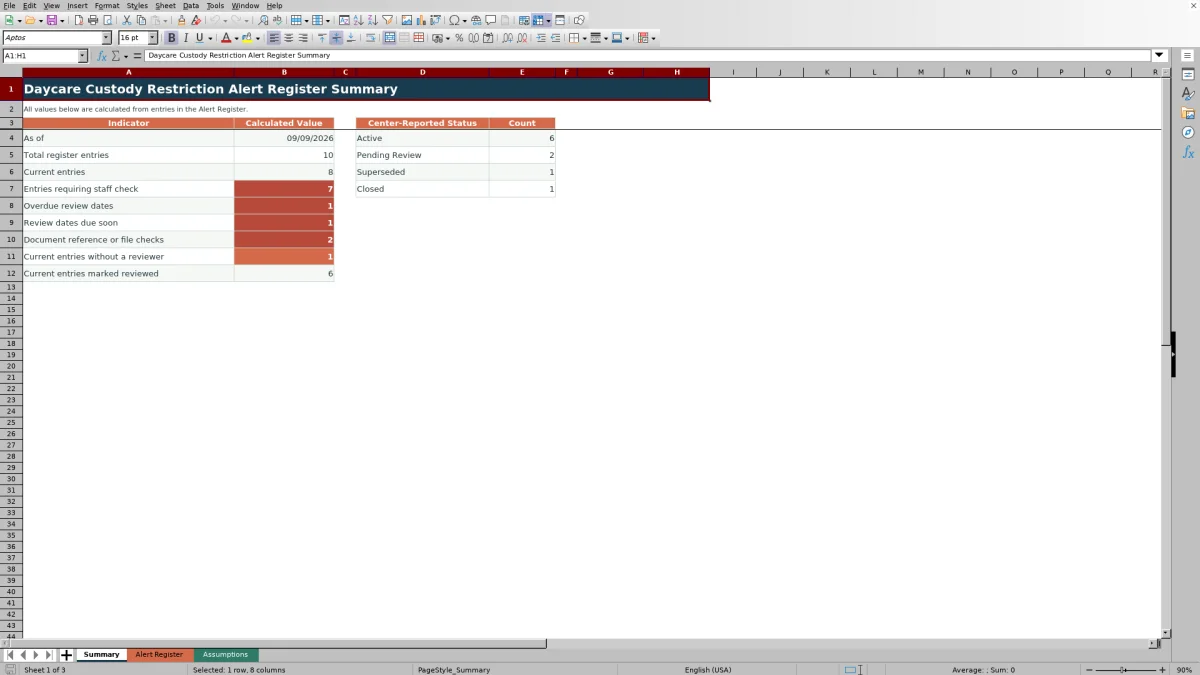
- Provides summary counts for Active, Pending Review, Superseded, and Closed entries without requiring manual counting.
- Supports privacy-conscious recordkeeping by using center-approved identifiers instead of requiring unnecessary personal details.
What is in the file
How to get started
1. Configure the center settings
Review the Assumptions sheet before use. Update the 14-day due-soon window, accepted date boundaries, 240-character limit, room choices, and stable status lists when center procedures require different values.
2. Enter the center-reported alert
On the Alert Register, assign a unique Alert ID and enter the child record ID, room, center-reported status, effective date, review due date, restricted-person reference, restriction summary, and internal document reference. Select whether the document is marked on file.
3. Review calculated checks
Examine Days to Review and the Staff Check Alert. Resolve missing details, document-reference issues, overdue reviews, or upcoming reviews by consulting the center’s current records rather than treating the formula as a pickup decision.
4. Record the review and make the next decision
Assign a reviewer, select the staff review status, enter the last-reviewed date, and add concise notes. Then follow center procedures to determine whether the alert remains Active or Pending Review or should be changed to Superseded or Closed.
What the Alert Register Tracks
Each row connects a unique alert to a child record ID, room, center-reported status, effective date, review due date, restricted pickup person reference, restriction summary, and internal document reference. Reviewer fields document who is assigned, whether staff have reviewed the entry, and when the last review occurred.
The workbook treats each calculated CHECK result as a human review prompt. It does not establish legal authority, store the referenced document itself, or replace the center’s pickup-verification procedures.
Reading the Summary and Staff Alerts
The Summary sheet counts all register entries and separates current entries—Active or Pending Review—from Superseded and Closed entries. It also counts rows requiring a staff check, overdue review dates, reviews due soon, document-reference or file issues, current entries without reviewers, and current entries marked Reviewed.
Days to Review uses the current date and remains blank for Closed or Superseded entries or when no review due date is entered. The due-soon period is controlled by the editable setting on the Assumptions sheet, which is initially 14 days.
Interpreted Practical Example
Situation: fictional entry FIC-ALERT-003 is Pending Review, has a review due date of September 14, 2026, and is marked as having a document on file, but its Internal Document Reference is blank. Action: the assigned reviewer examines the row and its calculated alert. Result: the Staff Check Alert returns “CHECK: add document reference,” and the Summary includes the entry among document-reference or file checks. Interpretation: selecting Yes for the file indicator does not provide staff with the internal reference needed to locate and verify the source record. Next decision: staff should locate the current center document, enter its approved internal reference, confirm the restriction through center procedures, and then reconsider the review status.
Common Entry Errors and Solutions
A duplicate Alert ID may fail the uniqueness validation; assign a distinct center-approved ID. A review due date earlier than the effective date may fail validation; verify both dates against the source record and correct the sequence. A date outside the accepted range may also fail validation; correct an entry error or update the center-approved boundaries on the Assumptions sheet.
A future Last Reviewed date or one earlier than the effective date may fail validation. Text longer than the configured 240-character limit may also be rejected. The correction is to verify the date, keep summaries and notes concise, or revise the editable limit only when center policy supports the change. If a CHECK alert reports a missing reference, reviewer, or file indicator, complete the field after consulting the current record.
Excel Register Comparison with Other Methods
This workbook operates as a complete operational method: structured entry fields, validation, calculated checks, summary counts, reviewer tracking, and editable assumptions work together. The appropriate method depends on center size, technology access, reporting needs, and required security controls.
| Method | More suitable when | Operational trade-off |
|---|---|---|
| Daycare Custody Restriction Alert Register Excel workbook | A center already uses Excel and needs a structured register with validation, review alerts, document references, and summary counts for up to 100 entries. | Staff must manage file access, backups, version control, and source-document verification outside the workbook. |
| Paper register or manual log | A small center has no reliable device access and needs an immediately available physical record under controlled storage. | Counts, due-date monitoring, duplicate detection, and incomplete-record checks require manual review. |
| Blank spreadsheet | A center needs a short, temporary list and does not require predefined fields, validation, calculated alerts, or summary reporting. | Staff must design and maintain the controls themselves, which can lead to inconsistent entries. |
| Dedicated childcare management software | A multi-site organization needs role-based access, audit histories, integrated child profiles, notifications, or centralized administration. | Implementation, subscriptions, configuration, and staff training may require additional resources. |
The Excel register is more suitable when staff need a controlled local workflow without implementing a larger management platform. Dedicated software is more suitable when access controls, system integration, and organization-wide audit functions are central requirements.
Validation and Center-Specific Settings
The Assumptions sheet contains the editable due-soon window, earliest and latest accepted dates, and description character limit. It also supplies the choices used for center-reported status, room, document-on-file selection, and staff review status.
Date validation allows blank values where applicable but checks entered dates against the configured boundaries. Review due dates cannot precede effective dates, and last-reviewed dates cannot be in the future or precede the corresponding effective date. Staff should revise assumptions deliberately because those changes affect validation and alerts throughout the register.
Operational Boundaries and Privacy
Use privacy-aware operation by limiting workbook access, using center-approved identifiers, controlling copies, and following the center’s retention and safeguarding procedures. The workbook records an internal document reference; it does not attach, authenticate, or replace the referenced order, agreement, directive, or center record.
An Active or Pending Review status indicates what the center has reported in the register. Before each relevant pickup decision, staff should consult the current source document, verify identity under center procedures, review any updates, and escalate uncertainty to the authorized center decision-maker.
Frequently asked questions
Does this Excel register decide whether someone may pick up a child?
No. It records center-reported restrictions and highlights entries for staff review. Pickup decisions should be made through the center’s approved procedures after staff verify the current source document and applicable instructions.
How many alert entries can the workbook hold?
The Alert Register provides 100 entry rows, from row 6 through row 105. The formulas, validation rules, filter range, and summary calculations are configured for those rows.
Can a center change the room and status choices?
Yes. The Assumptions sheet contains the listed rooms, center-reported statuses, document-on-file choices, and staff review statuses used by the register’s dropdown fields. Changes should reflect approved center terminology.
What does a CHECK result mean?
A CHECK result means the row needs human attention because information may be missing, a document reference or file indicator needs review, or a review date is overdue or approaching. It is not an automated authorization or denial.
Why can review counts change from one day to the next?
The workbook uses TODAY() for the as-of date, Days to Review, overdue checks, and due-soon checks. As the date changes, an entry can move into or out of those calculated categories even when staff have not edited the row.
Editorial responsibility

Lena MoralesEnrollment and classroom workflows

Jordan LeeWorkbook QA and center operations