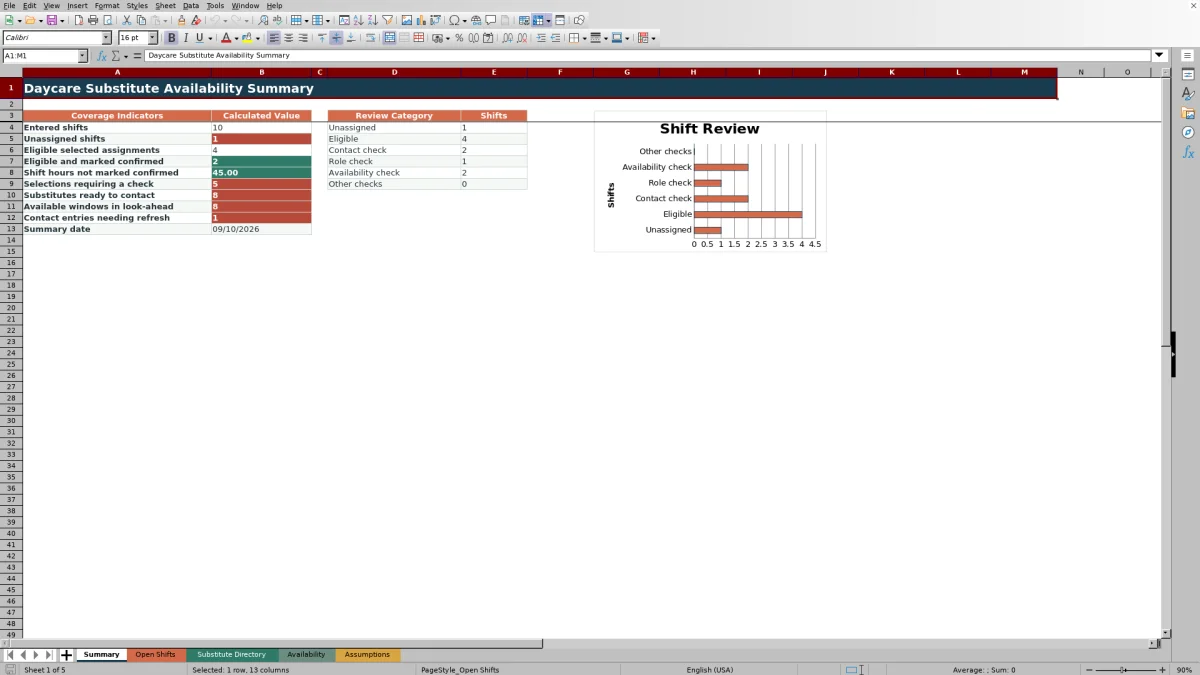
This daycare substitute availability spreadsheet is an Excel scheduling workbook for recording uncovered shifts and checking a chosen substitute against dated availability, approved classroom roles, and directory contact status.
Childcare-center operators can use the calculated review fields to assess each selected assignment, record the contact outcome, and monitor unassigned shifts, pending checks, confirmations, uncovered hours, and contact records that need attention.
How this workbook can help
- Brings open shifts, substitute records, availability windows, and scheduling assumptions into one coordinated workbook.
- Shows whether a selected substitute has an available entry, approval for the required role, and a current Ready to Contact status.
- Separates eligible selections from confirmed assignments so operators can see which coverage decisions still require contact.
- Flags incomplete records, invalid times, unusually long entries, missing substitute IDs, and other issues that need review.
What is in the file
How to get started
1. Review the scheduling assumptions
Open Assumptions and confirm the availability look-ahead, recent contact-check threshold, maximum shift length, and maximum availability-window length.
2. Maintain substitute and availability records
Enter each substitute in Substitute Directory, select approved roles and contact status, and then add dated time windows in Availability.
3. Enter and test an uncovered shift
Add the shift date, room, required role, start time, and end time in Open Shifts. Enter an Assigned Sub ID to calculate the substitute name, directory status, date availability, role check, time check, and overall match review.
4. Record contact results and review coverage
Set Contact Outcome to Not Contacted, Contact Attempted, Confirmed, or Declined. Use Summary to review eligible selections, confirmed assignments, unassigned shifts, remaining hours, and records requiring checks.
Situation: Start with the uncovered shift
The scheduling process begins with a coverage situation: a room needs an Infant, Toddler, Preschool, or Floater role for a specific date and time. On Open Shifts, the operator records the shift ID, date, room, required role, start time, and end time. The workbook calculates shift hours and flags missing details, invalid time ranges, or a shift longer than the maximum set on Assumptions.
Action: Test the selected substitute
After entering an Assigned Sub ID, the workbook performs match checks for that selected person. It looks up the substitute name and directory status, checks for an availability record on the shift date, verifies approval for the required role, and tests whether an Available time window covers the complete shift. This is a review of one selected substitute, not an automated list or ranking of every possible candidate.
Result: Read the match review
The Match Review field turns the underlying checks into an operational result such as Unassigned, Eligible - confirm contact, Check contact status, Check role, Check availability, Check substitute ID, or Incomplete shift. An eligible result indicates that the recorded directory, role, and availability conditions align; it does not mean the substitute has accepted the shift. Acceptance is recorded separately in Contact Outcome.
Interpretation: Practical daycare coverage example
Consider sample shift SH-002, which requests Toddler coverage on September 14, 2026, from 9:00 AM to 5:00 PM. SUB-002 is listed as Ready to Contact, is approved for the Toddler role, and has an Available window from 8:30 AM to 5:30 PM that day. The practical interpretation is that the selected substitute meets the recorded match conditions and can be contacted. Because the sample Contact Outcome is Contact Attempted rather than Confirmed, the shift can appear as eligible while remaining outside the count of eligible assignments marked confirmed.
Next decision: Confirm, change, or investigate
The next decision depends on the result. If the selection is eligible, contact the substitute and update the outcome after receiving a response. If the person declines, choose another Sub ID and review the recalculated checks. If the shift is unassigned or displays a check status, correct the relevant source record before treating the coverage as settled. Summary then shows how many assignments are eligible, confirmed, unassigned, or still awaiting review.
Common errors and solutions
When a result says Check substitute ID, verify that the Assigned Sub ID exactly matches an ID in Substitute Directory. For Check contact status, update the directory record and its Last Contact Check date as appropriate. For Check role, review the Yes or No approval recorded for the required role. For Check availability, add or correct the dated availability window and status. For Incomplete shift, supply the missing date, role, or times. If times are invalid or a duration is unusually long, repair the source entry or review the limits on Assumptions. The duration formulas require the end time to be later than the start time, so they do not treat an overnight window as a valid same-row duration.
Comparison with other scheduling methods
This workbook is a complete operational method built around three maintained record sets—open shifts, substitute directory records, and availability windows—plus calculated checks and a summary. The appropriate option depends on staffing volume, collaboration needs, and the level of automation required. Each alternative is more suitable when its operating conditions match the center's needs.
| Method | More suitable when | Operational trade-off |
|---|---|---|
| This Excel workbook | A center wants a structured local process for checking one selected substitute against availability, role approval, and contact status. | Includes formulas, validation, review statuses, and summary indicators, but does not rank multiple candidates or provide live multiuser scheduling. |
| Paper or manual log | A very small program handles occasional coverage and has reliable procedures for reviewing every detail by hand. | Easy to start, but availability, role approval, and contact checks are not calculated automatically. |
| Blank spreadsheet | A center needs a custom layout and has staff available to design formulas, controls, and review rules. | Offers flexibility, but the matching logic, validations, status checks, and dashboard must be built and maintained separately. |
| Dedicated childcare software | A larger or multi-site organization needs live collaboration, notifications, permissions, integrations, or automated candidate outreach. | May support broader workflows, but can require subscription costs, configuration, training, and migration of existing records. |
For a single-center workflow managed in Excel, this workbook provides a defined review path. For live communications, automatic outreach, or organization-wide staffing coordination, dedicated software may be more suitable.
Frequently asked questions
Does the workbook automatically recommend every eligible substitute?
No. Open Shifts evaluates the Assigned Sub ID entered for a shift. It does not generate or rank a list of all possible substitutes, so the operator selects a candidate and reviews the calculated checks.
How does the workbook determine whether availability covers a shift?
Date Availability checks whether the selected substitute has an Available or Tentative entry on the shift date. Time Check separately tests whether an Available window starts by the shift start and ends at or after the shift end.
Does the Substitute Directory store phone numbers or email addresses?
No. The directory stores a preferred contact method such as Phone, Email, Text, or Center Roster, but the workbook does not include dedicated fields for actual phone numbers or email addresses.
Can the workbook calculate overnight shifts or availability windows?
No. The duration formulas require the end time to be later than the start time on the same row. Overnight entries should be handled through the center's separate procedure or divided into same-day records where appropriate.
How many records can be entered in the prepared ranges?
Open Shifts, Substitute Directory, and Availability each provide 100 prepared rows, from row 5 through row 104. Their formulas, validations, filters, and summary references use these fixed ranges.
Editorial responsibility

Lena MoralesEnrollment and classroom workflows

Jordan LeeWorkbook QA and center operations