This daycare waitlist tracker is an Excel workbook for recording up to 200 waiting families and organizing requests by waitlist date, child age group, preferred and acceptable start dates, requested schedule, status, and contact outcome.
The XLSX serves as an administrative queue-review aid. It checks whether active records are ready for review, calculates wait and availability-window measures, ranks ready requests within each age group, and highlights follow-up needs while leaving placement decisions to center staff.
How this workbook can help
- Keep request details, availability dates, schedules, statuses, and contact history together in one structured queue.
- Identify active requests that are ready for review and records that need correction or follow-up.
- Prioritize ready families within the appropriate age group using a configurable review score and consistent tie-breaking rules.
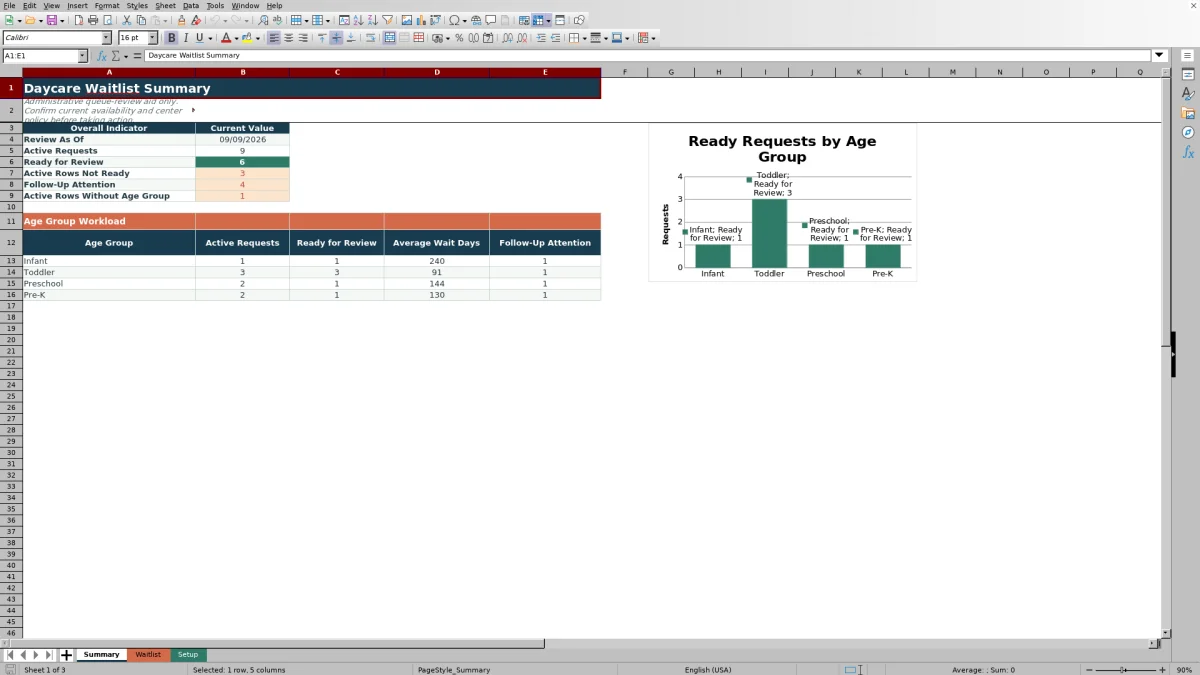
- Monitor active volume, ready requests, average wait days, missing age groups, and follow-up attention from the Summary sheet.
What is in the file
How to get started
Step 1: Confirm the review settings
Open Setup and verify the age bands, contact-outcome adjustments, status and schedule lists, scoring assumptions, and Review As Of date. The age-band check reports whether the configured ranges are continuous.
Step 2: Enter or update family requests
Use columns A through L on Waitlist for the request ID, dates, family alias, requested schedule, status, contact outcome, and next follow-up date. Keep each WL-prefixed request ID unique and leave the calculated columns M through U intact.
Step 3: Resolve records that are not ready
Read Review State and Alert for each active row. Correct missing fields, invalid list entries, date conflicts, contact-history inconsistencies, or age values outside the configured ranges before prioritizing the request.
Step 4: Review the queue and choose the next action
Filter for Ready records, review Age Group Review Rank within the relevant classroom group, and use Summary to check workload and follow-up attention. Confirm actual space, staffing ratios, schedule compatibility, and center policy before contacting a family or making an offer.
Situation: Replace a Scattered Daycare Waiting List
Paper notes, email threads, and disconnected files make it difficult to tell which families are still active, when they need care, and whether staff have followed up. This workbook places those details in one queue tied to a single review date. Each record can include the waitlist date, child birth date, preferred and acceptable start dates, requested schedule, request status, contact history, and next follow-up date.
Action: Configure and Maintain a Consistent Review Method
Start in Setup by confirming the review date, age ranges, scoring assumptions, contact adjustments, request statuses, and requested schedules. Staff then maintain the family-entered fields in columns A through L of Waitlist. Built-in validation checks identifiers, dates, text length, and list-based entries, while formulas in columns M through U perform the age, timing, readiness, scoring, ranking, and alert calculations.
Result: Build a Review-Ready Queue by Age Group
Complete, valid, active records can reach the Ready review state. Their scores combine wait days, urgency as the latest acceptable start approaches, and the configured contact-outcome adjustment. Ready requests are ranked within their calculated age group, with higher scores first; ties are resolved by the earlier waitlist date and then Request ID. Summary reports the resulting workload without treating every entered row as immediately actionable.
Interpretation: A Practical Daycare Waitlist Example
Situation: the included Aster Family sample has an active request dated January 12, 2026, a preferred start of October 5, and a latest acceptable start of October 20. Action: with the review date set to September 9, staff maintain the contact outcome as Reached - Interested and confirm the required fields. Result: the formulas classify the child as Infant, calculate 240 wait days and 41 window days remaining, and apply the configured 10-point contact adjustment. Because 41 days is outside the 30-day urgency horizon, no urgency points apply, producing a 250.0 review score if the row is Ready. Interpretation: the score is driven by the long wait and positive contact adjustment, not by an expiring availability window. Next decision: review the request’s rank among ready Infant records, then confirm real capacity and schedule fit before contacting the family.
Next Decision: Apply Capacity and Center Policy
The calculated rank identifies which ready records warrant review within an age group; it does not reserve a seat or create a center-wide placement order. The workbook does not track classroom openings, staffing ratios, tuition, subsidies, or confirmed enrollment. A human decision is still required to match a family’s schedule and availability window with current capacity and the center’s enrollment rules.
Errors and Solutions for Reliable Queue Review
An Incomplete state means required information is missing; fill the relevant source cells rather than typing over a formula. An invalid status, schedule, or contact outcome should be corrected with an option from the Setup lists. A future waitlist date or inconsistent contact date should be verified and corrected or left for a later review. “Outside configured ranges” calls for checking the birth and preferred-start dates or updating valid age bands in Setup. Contact and follow-up alerts should be resolved by aligning the outcome with the last-contact date and recording the next action. In every case, fix the source field and allow the workbook to recalculate the review state, score, rank, and alert.
Comparison: Excel Tracker vs. Other Waitlist Methods
The workbook should be evaluated as a complete operational method—Setup rules, structured request entry, calculated review logic, alerts, filters, and Summary reporting—not as three unrelated worksheets.
| Consideration | This Excel workbook | Paper or manual process | Blank spreadsheet | Dedicated childcare software |
|---|---|---|---|---|
| Initial setup | Includes configured sheets, formulas, validation, age bands, assumptions, and sample records. | Familiar but requires staff to create and maintain a filing method. | Flexible, but staff must design fields, formulas, validation, and reporting. | Usually requires platform configuration, data import, training, and an ongoing subscription. |
| Prioritization | Calculates readiness, a review score, and rank within each age group. | Requires staff to compare dates and notes manually. | Depends entirely on formulas and rules created by the user. | May provide configurable queues or enrollment workflows; available logic varies by product. |
| Follow-up control | Tracks last contact, outcome, next follow-up date, alerts, and summary attention counts. | Relies on handwritten notes, calendars, or separate reminders. | Requires custom columns and manually designed reminders or formulas. | May include integrated messaging and automated reminders, depending on the system. |
| Best fit | Centers that want a transparent, locally managed review process for up to 200 requests. | Very small, low-volume lists where formal scoring and reporting are unnecessary. | Teams with spreadsheet expertise and requirements that justify building their own method. | Organizations needing multi-user access, integrated communications, enrollment workflows, or broader center-management functions. |
Excel offers more structure than paper or an empty grid without requiring a full software platform. Dedicated childcare software may be the stronger alternative when staff need simultaneous access, automated family communications, capacity integration, or a system that extends beyond waitlist review.
Frequently asked questions
What does the daycare waitlist review score include?
For rows marked Ready, the score combines wait days, urgency as the latest acceptable start approaches, and the configured adjustment for the selected contact outcome. The weights and urgency horizon are stored on Setup.
Is the review rank a center-wide waiting-list position?
No. The workbook ranks ready requests within their calculated age group. Staff should not interpret an Infant rank and a Preschool rank as positions in one shared center-wide queue.
Can the daycare age groups be changed?
Yes. Setup contains minimum and maximum ages in months for Infant, Toddler, Preschool, and Pre-K. Keep the ranges complete and continuous; the age-band status cell warns when the configuration needs review.
Does this Excel tracker show available daycare seats?
No. It organizes requests for review but does not track classroom capacity, staffing ratios, schedule openings, or confirmed placements. Staff must verify current availability separately before making an offer.
How many family requests can the workbook hold?
The supplied Waitlist formulas, validation, filters, and Summary references cover rows 2 through 201, providing space for 200 requests. Expanding beyond that range requires carefully extending the formulas, validation, formatting, filter range, and Summary references.
Editorial responsibility

Lena MoralesEnrollment and classroom workflows

Jordan LeeWorkbook QA and center operations