This child profile Excel workbook organizes operational enrollment details such as room assignment, usual schedule, routine notes, guardian and emergency contacts, pickup plan, profile review dates, and status. It provides space for 100 child profiles and 100 linked service authorization records.
Editable lists help a childcare center apply its own room, staff, schedule, pickup, service, and status choices. Formulas calculate review dates, flag records for staff attention, look up child names on authorization records, and populate a summary based on entered data. The included fictional records are placeholders, and every calculated check still requires manual staff review.
How this workbook can help
- Keeps child enrollment, room, routine, contact, pickup, and review details in one structured workbook.
- Links service authorization records to child profiles through Profile ID entries and child-name lookups.
- Surfaces missing fields, inconsistent dates, upcoming reviews, and authorization records that need staff attention.
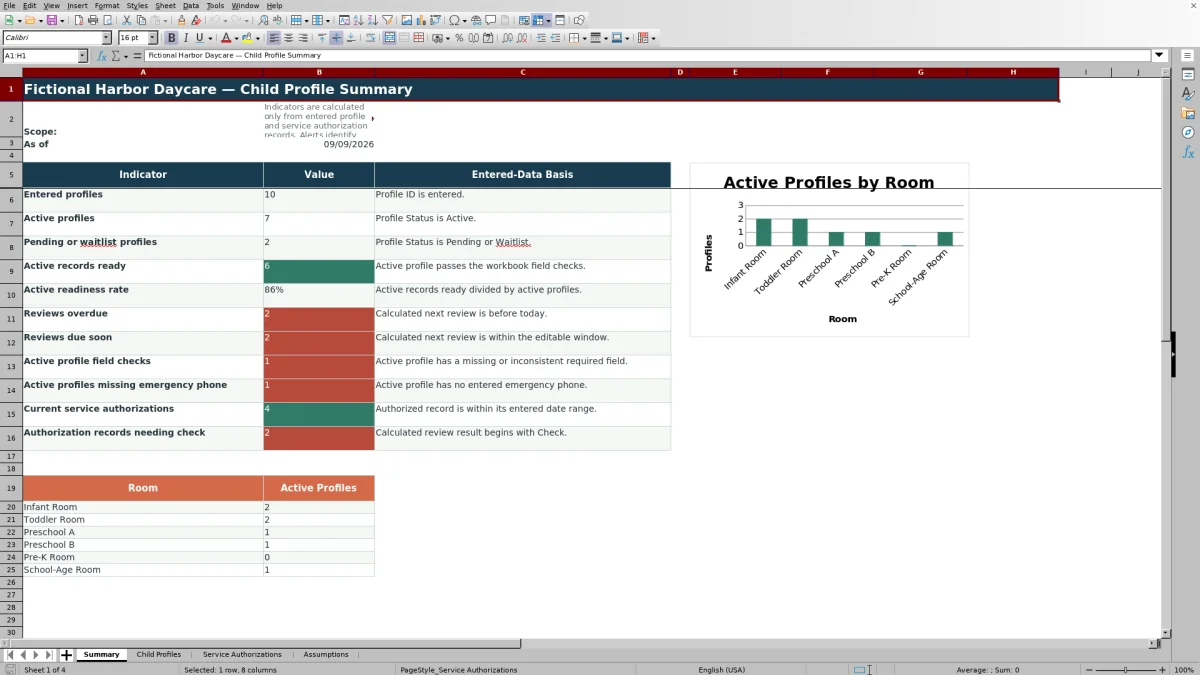
- Provides summary counts and an active-profiles-by-room chart for routine administrative review.
What is in the file
How to get started
1. Configure the local choices
Open the Assumptions sheet and replace the fictional room, staff, schedule, pickup plan, service type, and status choices with the center’s own options. Confirm the profile review interval, due-soon window, and permitted date ranges.
2. Enter each child profile
On Child Profiles, assign a unique Profile ID and enter the child’s display name, dates, profile status, room, primary staff, schedule, routine notes, contact labels and phone numbers, pickup plan, and last profile review date. Use the dropdown lists where provided.
3. Resolve profile checks
Read the calculated Next Review, Review Alert, and Record Check columns. Correct missing information, invalid dates, reversed date order, or other inconsistencies in the editable cells, then confirm the revised result.
4. Add authorizations and review the summary
Enter each service record on Service Authorizations using an existing Profile ID. Check the child-name lookup and Review Result, then use Summary to review profile readiness, overdue or upcoming reviews, missing emergency phones, authorization checks, and active profiles by room.
What the Excel workbook records
The Child Profiles sheet stores the operational details staff commonly need to organize enrollment records: Profile ID, child display name, birth and enrollment dates, profile status, room, primary staff, usual schedule, routine notes, guardian contact, emergency contact, pickup plan, and profile review dates. Its prepared range supports 100 child profiles.
Service Authorizations provides a separate linked record for meals, transportation, field trips, extended care, photography, or locally edited service choices. Each record can include its status, effective and end dates, and a reference or note. The child display name is filled through a Profile ID lookup rather than entered again manually.
How review checks support follow-up
The workbook calculates a next review date by adding the editable review interval to the last profile review date. For active profiles, the Review Alert can indicate that a review is current, due soon, overdue, missing, or affected by a date problem. Profiles that are not active are shown as not tracked by that review calculation.
The Record Check evaluates entered profile information for missing or inconsistent fields. The authorization Review Result similarly checks the linked child ID, required fields, date formats, date order, authorization status, and entered date range. These results direct attention to a row; they do not independently verify the underlying record.
Practical example: from profile alert to next decision
Situation: The fictional sample profile FCP-001 is active in the Infant Room, has a last profile review dated March 28, 2026, and is linked to a Meals authorization with entered dates of February 21 through December 8, 2026.
Action: A staff member reviews the profile’s contacts, pickup plan, routine information, and last review date, then checks the linked service record against the center’s source documentation.
Result: The workbook calculates the next profile review using the interval on Assumptions. It also evaluates whether the profile review is current, approaching, or overdue and whether the authorization fields and date range support a current result on the day the file is opened.
Interpretation: A current result means the entered status and dates pass the workbook’s calculation at that time. It does not prove that consent remains valid or that the source document is accurate.
Next decision: Staff can retain the record after confirming its source, correct an entry, request updated documentation, or change the administrative status according to the center’s own process.
Common errors and solutions
Checks are prompts, so staff should correct the source entry rather than treating the message as a final determination. If a duplicate Profile ID or Authorization ID is entered, assign a unique ID. If Service Authorizations shows “Check child ID,” confirm that the Profile ID exactly matches an existing entry on Child Profiles.
A date-format warning can occur when a date is entered as text or falls outside the configured limits; re-enter it as a valid Excel date and review the boundaries on Assumptions. A date-order warning means an end date precedes an effective date or an enrollment date precedes a birth date; verify both dates against the source record. If an active profile is missing required operational details or an emergency phone, complete the relevant editable fields and review the recalculated result.
Comparison with other recordkeeping methods
The following comparison treats the four-sheet Excel workbook as one complete operational method and contrasts it with realistic external alternatives.
| Method | More suitable when | Operational considerations |
|---|---|---|
| Four-sheet Excel workbook | More suitable when a center wants a locally managed file with prepared profile fields, linked authorization records, validations, calculated checks, filters, summary indicators, and a room chart. | Staff must maintain the file, protect sensitive information, preserve formulas, review alerts, and verify entries against source records. |
| Paper forms and a manual binder | More suitable when computer access is limited and the record volume is small enough for direct manual review. | Paper does not calculate review dates, perform child-ID lookups, filter records, or update summary counts automatically. |
| Blank spreadsheet | More suitable when a center needs a narrowly customized list and has staff able to design its own formulas, validations, review logic, and reporting. | It begins without the prepared fields, linked workflow, checks, assumptions, and dashboard included in this workbook. |
| Dedicated childcare software | More suitable when a center needs features such as multiuser access, family portals, electronic signatures, integrated billing, or multi-site administration. | Capabilities vary by provider and may involve subscriptions, implementation, training, access controls, and vendor-specific privacy terms. |
The appropriate choice depends on record volume, staff workflow, connectivity, security requirements, collaboration needs, and whether the center needs functions beyond local XLSX recordkeeping.
Privacy and administrative limits
Child profiles and contact details can be sensitive. Store the XLSX in an approved location, restrict access to appropriate staff, control copies and exports, and follow the center’s retention and privacy procedures. Remove the fictional sample records before entering operational information.
The workbook does not confirm identity, legal pickup authority, consent, service eligibility, licensing compliance, or the authenticity of supporting documents. Its calculations use the values entered by staff and should remain part of a documented human review process.
Using results for the next administrative decision
The Summary sheet counts entered, active, pending, and waitlist profiles; active records that pass the workbook’s field checks; overdue and upcoming reviews; active profiles missing an emergency phone; current service authorizations; and authorization records needing attention. It also groups active profiles by the room choices listed on Assumptions.
Operators can use those results to decide which records to review first, whether room assignments need confirmation, which emergency contact details require follow-up, and which authorization records need source-document review. After staff correct an entry, the formulas and summary indicators recalculate, allowing the next decision to be based on the revised record.
Frequently asked questions
How many child profiles can the Excel workbook hold?
The prepared Child Profiles range contains 100 data-entry rows, from row 6 through row 105. The Service Authorizations sheet also contains 100 prepared record rows.
Can the room, staff, schedule, pickup, and service choices be changed?
Yes. Those lists are maintained on the Assumptions sheet and can be edited to reflect local center terminology. The workbook’s dropdown validations reference those prepared list ranges.
What does the profile Review Alert show?
For an active profile, it evaluates the last and calculated next review dates and can identify a current review, a review due soon, an overdue review, a missing date, or a date issue. Profiles that are not active are marked as not tracked by this calculation.
Does a current service result prove that an authorization is valid?
No. The result reflects the entered Profile ID, service fields, status, and date range. Staff still need to inspect the applicable source record and follow the center’s authorization and consent procedures.
What should staff do when a row displays a check message?
Read the specific message, compare the row with its source documentation, and correct missing, mismatched, or invalid entries in the editable fields. Then review the recalculated result instead of treating the original message as an official determination.
Editorial responsibility

Lena MoralesEnrollment and classroom workflows

Jordan LeeWorkbook QA and center operations