This Daycare Behavior Incident Log Excel workbook provides a structured way for childcare-center staff to create an objective, nonclinical incident record. It captures when and where an event occurred, who observed it, the activity or context, what was directly observed, the immediate response, family communication, follow-up, and review status.
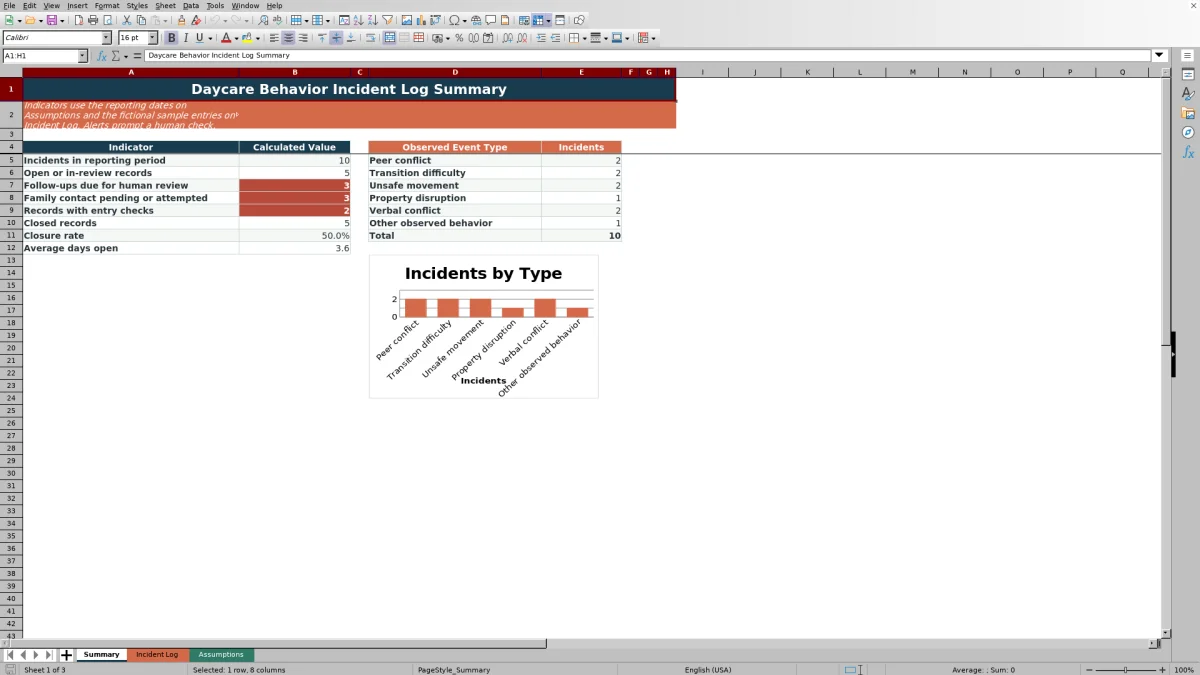
The XLSX includes a 100-row Incident Log, a Summary sheet, and an Assumptions sheet for reporting dates, review timing, and entry-list choices. Formulas calculate review target dates and days open, while record checks identify entries that may require staff attention. The included records are fictional examples and should be replaced or removed before operational use.
How this workbook can help
- Keeps observed events, context, immediate responses, and family communication in one consistent record.
- Supports objective documentation without asking staff to assign motives, diagnoses, or clinical interpretations.
- Helps staff monitor follow-up needs, review status, review target dates, and the number of days a record remains open.
- Provides reporting-period indicators for incidents, open or in-review records, family contact, record checks, closures, and average days open.
What is in the file
How to get started
1. Configure the reporting settings
Set the working rules on the Assumptions sheet. Review the reporting-period dates, review-target days, earliest permitted event date, room choices, observer choices, event types, and workflow statuses.
2. Enter the observed incident
Record observable facts in the yellow cells of the Incident Log. Add a unique incident ID, event date and time, child ID, room, observer, event type, context, objective description, and immediate response.
3. Document communication and follow-up
Select the family contact status and enter the contact date when applicable. Indicate whether follow-up is needed, add a due date, and update the follow-up and review statuses as work progresses.
4. Review calculations and summary indicators
Check the calculated review target date, days open, and Record Check message. Resolve any flagged entry issue, then use the Summary sheet to review reporting-period counts, closure rate, average days open, and incidents by observed event type.
What the Daycare Behavior Incident Log Records
The Incident Log contains fields for incident ID, event date and time, child ID, room, observer, observed event type, context or activity, objective description, immediate response, family contact, follow-up, and review. It also includes calculated columns for review target date, days open, and record checks. This structure keeps the event record and its administrative follow-through together without turning the log into a clinical assessment.
Writing Objective Incident Descriptions
Staff should separate observation from interpretation. Record visible actions, spoken words when relevant, the activity underway, and the response taken by staff. For example, “The child climbed onto a chair and stepped toward the adjacent table” describes an observable event. A statement about the child’s intent would go beyond what the workbook is designed to document.
Following an Incident Through Review
The workbook supports a practical workflow from initial entry through closure. Family contact can be marked Not Needed, Pending, Attempted, or Completed. Follow-up can be identified as needed and tracked by due date and status, while the record itself can be marked Open, In Review, or Closed. The review target is calculated by adding the editable number of review-target days to the event date.
Practical Example and Interpretation
Situation → action → result → interpretation → next decision: During an indoor movement activity, a child climbs onto a chair and steps toward a nearby table. A staff member directs the child back to the floor, moves nearby chairs away, and enters those observable details in the log. The staff member marks family contact as Attempted, indicates that follow-up is needed, enters a due date, and leaves the review status as In Review. With the displayed three-day setting, the workbook calculates a review target three calendar days after the event, and Days Open can continue calculating while the record is not Closed. This result indicates an unfinished administrative workflow; it does not explain the child’s motivation or provide a clinical conclusion. The next decision is for staff to complete the planned follow-up, document actual communication, finish the review, and update the applicable statuses and completion date.
Common Entry Errors and Solutions
The Record Check column can flag issues such as a missing event date, missing incident ID, duplicate incident ID, future event date, date earlier than the configured limit, or missing event time. Correct a missing value in its source cell, assign a unique ID when a duplicate is identified, and confirm dates against the event record and Assumptions settings. If a list entry is unavailable, update the relevant choice on the Assumptions sheet rather than typing inconsistent variations. Treat every alert as a prompt for human verification rather than an automatic compliance finding.
Comparison With Paper Logs and Blank Spreadsheets
The Excel workbook operates as one complete method combining structured incident entry, status tracking, calculated review fields, record checks, and reporting-period indicators. It is more suitable when a childcare center wants those functions in one configurable XLSX. Paper may be more suitable when staff need an offline handwritten record at the point of care, while a blank spreadsheet may be more suitable when an organization intends to design and maintain its own fields, formulas, validation, and reporting.
| Method | Entry structure | Review support | Reporting support | More suitable when |
|---|---|---|---|---|
| Daycare Behavior Incident Log Excel workbook | Preset fields, validated dates and times, and drop-down choices | Calculated target dates, days open, workflow statuses, and record checks | Reporting-period indicators and an observed-event-type chart | The center wants a ready-structured XLSX that staff can configure through an Assumptions sheet |
| Paper incident log | Handwritten fields determined by the printed form | Deadlines and open records require manual review | Counts and trends require manual compilation | Immediate handwriting and operation without a computer are the main conditions |
| Blank spreadsheet | Columns and entry rules must be created locally | Formulas, checks, and statuses must be designed and maintained | Summaries and charts must be built separately | The organization needs a fully custom design and has staff available to build and test it |
Dedicated childcare software may be more suitable when a center needs the incident process integrated with broader systems or centrally administered access controls. This workbook does not itself provide user accounts, cloud permissions, notifications, or system integrations.
Human Review, Privacy, and Record Closure
Use human review before relying on any indicator or closing a record. Summary values depend on the selected reporting dates and the completeness of Incident Log entries, and sample records affect displayed totals until removed. Use non-identifying child IDs where appropriate, limit access according to center policy, and follow applicable privacy, safeguarding, emergency-response, retention, and reporting procedures outside the workbook.
Frequently asked questions
Does the workbook provide a clinical assessment of a child’s behavior?
No. It is designed to document observed events, context, immediate staff responses, family communication, follow-up, and review status without diagnosing a child or assigning a clinical interpretation.
How many incident records can the Incident Log hold?
The prepared entry area contains 100 rows, running from row 4 through row 103. Formula columns for review target date, days open, and record checks are included across those rows.
Can the room, observer, event type, and status choices be changed?
Yes. The Assumptions sheet contains editable lists for rooms, observers, event types, family contact statuses, follow-up choices, and review statuses. These lists support the drop-down fields in the Incident Log.
What should staff do when the Record Check column displays an alert?
Review the source entry, correct the missing, duplicate, or invalid value, and confirm that the record reflects what actually occurred. The alert is an entry-quality prompt and should not be treated as a legal, policy, or compliance determination.
Should the fictional sample records remain in the operational log?
No. Remove or replace the fictional examples before operational use because they affect Summary counts and chart results within the selected reporting period.
Editorial responsibility

Lena MoralesEnrollment and classroom workflows

Jordan LeeWorkbook QA and center operations