This daycare authorized pickup list Excel workbook helps childcare-center staff record each child’s pickup people, relationships, verification notes, authorization status, effective dates, and review history in one structured file.
It is an internal administrative record with data checks, pickup indicators, review alerts, and summary counts. Staff must still verify identity, review the applicable child’s record, and follow center procedures before releasing a child.
How this workbook can help
- Keeps child, pickup-person, relationship, verification, authorization, and date details together in a filterable register.
- Separates entered authorization status from the calculated pickup indicator so staff can see pending, expired, incomplete, and other do-not-release conditions.
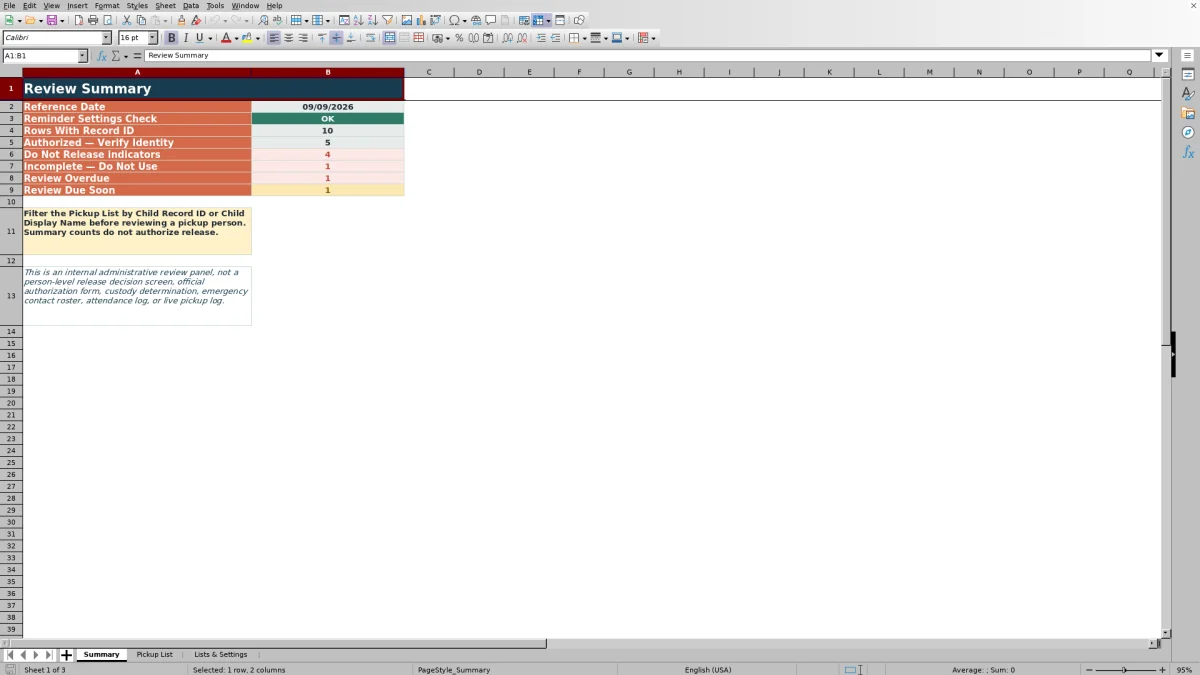
- Highlights overdue and upcoming reviews based on the editable reference date, review interval, and warning period.
- Helps staff find data problems such as missing required entries, duplicate pickup record IDs, invalid list values, or inconsistent information.
What is in the file
How to get started
1. Confirm the settings
Check the reference date on Lists & Settings before reviewing records. Confirm the review interval and warning period; the settings check should display OK.
2. Replace the demonstration records
Remove or overwrite rows 2–11 on Pickup List. Enter a unique pickup record ID, child details, pickup-person name, relationship, verification note, authorization status, effective date, and last reviewed date. Add an end date when the authorization is time-limited.
3. Review the calculated fields
Resolve every Data Check message before using a row. Then read the Pickup Indicator and Review Alert; these formulas distinguish records that pass workbook checks from pending, not-yet-effective, expired, unauthorized, or incomplete records.
4. Make the release decision
Filter by the child’s record ID or display name, locate the correct pickup person, compare identity with the verification note, and follow center procedures. Do not use Summary counts as person-level release approval.
What the Daycare Authorized Pickup List Records
The Pickup List records a pickup record ID, child record ID, child display name, pickup-person name, relationship, verification note, authorization status, effective date, optional end date, and last reviewed date. Calculated columns then show the review due date, data-check result, pickup indicator, and review alert. Staff can filter the list by child record ID or child display name before reviewing a specific person.
How Authorization and Review Logic Work
The entered authorization options are Authorized, Pending Review, and Not Authorized. A row marked Authorized does not automatically become a release decision: the formulas also evaluate data completeness and applicable dates. A passing row displays Authorized — Verify Identity, while pending, unauthorized, not-yet-effective, expired, or incomplete records display restrictive indicators. The review due date is calculated from the last reviewed date plus the configured review interval, and the alert compares that date with the editable reference date and warning period.
Interpreted Practical Example
Practical example: Situation — the fictional Avery Sample record lists Jordan Example as a Parent/Guardian with Authorized status, an effective date of August 15, 2026, and a last reviewed date of August 15, 2026. Action — with the reference date set to September 9, 2026, staff filter for child record DEMO-CH-01 and inspect the calculated fields. Result — under the supplied 365-day interval, the review due date is August 15, 2027, the review alert is Current, and the pickup indicator is Authorized — Verify Identity. Interpretation — the entered data and dates pass the workbook’s checks, but the indicator is not final release approval. Next decision — staff compare the person’s identity with the verification note and follow center procedures; if identity cannot be confirmed, the child is not released based on the spreadsheet result alone.
Common Errors and Solutions
Common errors and solutions: Missing Required Entry means one or more required fields need completion; Duplicate Record ID requires assigning a unique pickup record ID; Invalid Relationship or an invalid authorization value requires choosing an option from the configured lists; inconsistent dates require correcting the effective, end, or review dates; and Settings Error requires checking the reference date, review interval, and warning period on Lists & Settings. A row marked Incomplete — Do Not Use or Fix Record should be corrected before staff rely on its indicator or reminder.
Comparison With Paper, Blank Spreadsheets, and Childcare Software
The complete Excel workbook method combines structured entry, validation, calculated indicators, review reminders, filtering, and summary counts. The alternatives below may be more suitable when different operating conditions apply.
| Method | Operational approach | Limitations | More suitable when |
|---|---|---|---|
| This Excel workbook | Maintains up to 100 pickup records with controlled lists, date checks, formula-based indicators, review alerts, and summary counts. | Requires staff to maintain the reference date, replace demonstration data, control file access, and verify identity outside the workbook. | A center needs a local, structured register with built-in administrative checks and can manage one controlled XLSX file. |
| Paper or manual process | Uses printed lists or forms reviewed by staff without a computer. | Filtering, duplicate detection, date review, and version control are manual. | A small program operates primarily offline or needs signed paper records under its established procedures. |
| Blank spreadsheet | Allows staff to design fields and workflows from the beginning. | It has no pickup-specific validation, indicators, or reminder formulas unless staff build and test them. | The center’s required fields differ substantially and it has resources to design, validate, and maintain its own spreadsheet controls. |
| Dedicated childcare software | May connect pickup permissions with child profiles, attendance, user accounts, notifications, or audit features, depending on the product and configuration. | May involve subscription costs, setup, training, data migration, and vendor-specific privacy controls. | The center needs multi-user access and integration with broader enrollment or attendance workflows. |
No method replaces staff judgment, identity verification, custody-related procedures, or applicable legal and center requirements.
Privacy and Administrative Boundaries
The workbook’s demonstration note directs users not to enter identification numbers or attach identification images. A concise verification note can document that an identity name was matched without storing sensitive document details. The file is not an official authorization form, custody determination, emergency-contact roster, or substitute for the center’s release policy. Access, storage, retention, and sharing should follow the center’s privacy and records-management practices.
Ongoing Review and Next Decisions
Review Overdue means the calculated due date is before the reference date, while Review Due Soon means it falls within the configured warning period. Current means the due date is outside that period, and Fix Record means a data problem must be corrected before the reminder can be used. After reviewing an alert, staff should update the underlying authorization information and last reviewed date when appropriate, then confirm the revised Data Check, Pickup Indicator, and Review Alert before the next pickup decision.
Frequently asked questions
Does Authorized — Verify Identity mean staff can release the child?
No. It means the entered status and dates passed the workbook’s checks. Staff must still filter for the correct child, compare the pickup person’s identity with the verification note, and follow the center’s release procedures.
Which pickup-list fields are required?
The formulas require a pickup record ID, child record ID, child display name, pickup-person name, relationship, verification note, authorization status, effective date, and last reviewed date. The end date is optional and can be used for time-limited authorization.
How are review due dates and alerts calculated?
The review due date equals the last reviewed date plus the review interval stored on Lists & Settings. The alert compares that due date with the editable reference date and warning period to return Review Overdue, Review Due Soon, or Current; a data problem returns Fix Record.
Should staff enter driver’s license numbers or store ID images in this workbook?
No. The workbook’s administrative note says not to enter identification numbers or attach identification images. Use a concise verification note, such as recording that the name on a photo ID was matched, without storing the ID number.
What should staff do with the fictional demonstration data?
Rows 2–11 contain fictional examples and should be removed or overwritten before operational use. After replacement, confirm that each pickup record ID is unique and review the Data Check, Pickup Indicator, and Review Alert for every completed row.
Editorial responsibility

Lena MoralesEnrollment and classroom workflows

Jordan LeeWorkbook QA and center operations